ANSI vs ISO Keyboard Layout: Differences and How to Tell Which You Have
ANSI vs ISO is a question about the shape of a keyboard, not the language on it: ANSI boards have a wide one-row Enter key, ISO boards have a tall two-row Enter, a shorter left Shift and one extra key beside Z. That one extra key is also how a computer can tell them apart, because it reports a key code (IntlBackslash) that no ANSI keyboard has; the keyboard tester shows your board on either layout and the mini tester further down this page gives a verdict the moment you press the key next to Z. The rest of the guide covers which countries use which, where JIS and the other layouts fit, and why the difference matters when you buy keycaps or a replacement keyboard.
ANSI vs ISO: the visual difference
Put an ANSI and an ISO keyboard side by side and the letters, numbers, function keys and modifiers are in the same places. Four things differ, all on the right and left edges of the main block. The keycode finder shows the event.code of any key you press, which is how you confirm which physical key a board has.
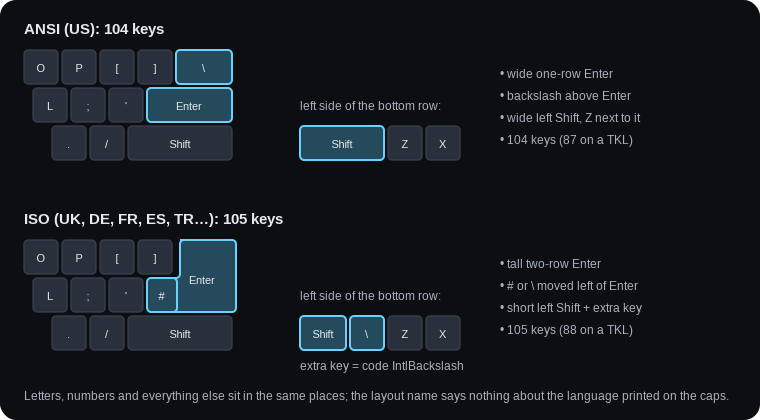
Enter. ANSI Enter is a wide rectangle on the home row, 2.25 units wide. ISO Enter spans two rows, the home row and the one above it, in the shape of an upside-down L: narrower at the top, wider at the bottom. It is the most visible difference and the one people usually mean when they say a keyboard “looks European”.
The backslash key. Because the ISO Enter occupies the right end of the upper letter row, the key that sits there on ANSI (backslash and pipe on a US board) moves down to the home row, between the apostrophe and Enter, and shrinks to a single unit. On a UK ISO board that key carries # and ~; on a German board it is the # key as well; the legend varies by country, but the position is the ISO giveaway.
Left Shift. ANSI left Shift is 2.25 units wide and Z sits directly to its right. ISO left Shift is 1.25 units, and between it and Z there is an additional key, which on a UK board carries \ and |, on a German board < > |, on a French board < >. This is the key that reports IntlBackslash and the one the tester looks for.
Key count. A full-size ANSI keyboard has 104 keys; the equivalent ISO has 105, the extra being the key next to Z. On tenkeyless boards the counts are 87 and 88.
Two smaller differences follow from these. The right Alt on ISO boards is almost always AltGr, a third-level shift that types the extra characters European layouts need (€, @, |, { and so on depending on the country), which is a software function but is printed on the cap. And the stabilised keys differ: ANSI has a stabiliser under Enter and both Shifts; ISO has one under the tall Enter (mounted vertically on some boards), one under right Shift and none under the short left Shift. That matters for keycaps, below.
Which countries use which
The two names come from the standards bodies whose documents first described them: ANSI for the American National Standards Institute, ISO for the International Organization for Standardization. In practice they describe markets. ANSI is the layout of the United States and English-speaking Canada, and of most keyboards sold with English legends in Asia and much of the world; a US-International layout in software on an ANSI board is also common in the Netherlands and among programmers elsewhere. ISO is the layout of the United Kingdom and Ireland and of almost all of continental Europe: Germany and Austria (QWERTZ), France and Belgium (AZERTY), Spain, Italy, Portugal, the Nordic countries, Turkey, Poland and the rest, each with its own legends on the same 105-key physical frame. French Canada uses an ISO-shaped board with its own layout.
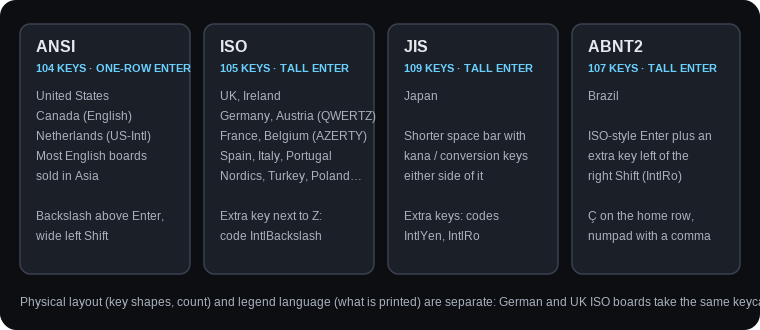
Keep the two things apart: the physical layout (ANSI or ISO, the shapes and count of keys) and the logical layout (the operating system’s mapping, US, UK, German, French, Turkish Q). A German keyboard is ISO physically and QWERTZ logically; a UK keyboard is ISO physically and UK QWERTY logically; a US keyboard is ANSI physically and US QWERTY logically. You can run any logical layout on any physical board, which is why a UK layout on an ANSI board types # where \ is printed and why the keyboard not working guide treats “typing the wrong characters” as a settings problem. The physical layout decides where the keys are; the operating system decides what they type.
Switching between ANSI and ISO: what changes for typing
People who move between the two layouts, a UK typist on a US laptop, a German developer on an imported ANSI board, notice three things in the first hour and nothing after the first week. The first is Enter: on ISO the little finger reaches up and right to a tall target, on ANSI it reaches straight right to a wide one, and the muscle memory for the other layout sends the finger to the wrong place a few times a day until it adjusts. The second is left Shift: coming from ANSI to ISO, the little finger lands on the extra key instead of Shift and types a stray \ or < before a capital; coming from ISO to ANSI, the finger finds Shift wider than expected and nothing goes wrong, which is why the ANSI direction is the easier switch. The third is the backslash or hash key, which simply isn’t where it was, and whose legend may not match what the operating system types if the logical layout wasn’t changed as well.
None of this touches typing speed once learned; the letters, the numbers and the common punctuation are identical. What does persist is the logical layout question. On an ANSI board with a European logical layout, the characters that lived on the missing key next to Z move elsewhere or disappear; Windows and macOS provide alternatives on most layouts (the key above Tab, or AltGr combinations), and the US-International layout exists so that ANSI users can type accents through dead keys. On an ISO board with a US logical layout, the extra key types a second backslash and the tall Enter works as Enter, so nothing is lost. If you are choosing a board to use with a layout it wasn’t designed for, that asymmetry favours ISO hardware with any logical layout, and ANSI hardware with US or US-International.
JIS and other layouts
Japan uses JIS, a third physical layout: a tall ISO-style Enter, 109 keys on a full-size board, a shorter space bar with conversion and kana keys on either side of it, and two extra keys with their own codes, IntlYen next to Backspace and IntlRo next to the right Shift. Korean keyboards are ANSI-shaped with two extra keys by the space bar for Hangul and Hanja. Brazil’s ABNT2 is ISO-like with a tall Enter and an extra key left of the right Shift (also reported as IntlRo), a Ç on the home row and a comma on the number pad. Older Apple keyboards used a short one-row Enter with a backslash above it in a different arrangement, and current Apple boards follow ANSI in the US and ISO elsewhere, with their own modifier legends. The keyboard tester includes JIS as a physical layout and marks the extra keys, so a Japanese board shows correctly even before Japanese legends are added.
Check yours
Click the keyboard below and press the key to the left of Z, then the key to the left of Enter on the home row. On an ISO board the first reports IntlBackslash, which the box names immediately; on an ANSI board that position is the left Shift, and the key above Enter reports Backslash. The drawing shows the ISO layout; if you have ANSI, the full keyboard tester lets you switch the drawing to ANSI full-size, tenkeyless, 75 %, 60 %, laptop, Mac or JIS and lights up your keys on the right picture.
Click the keyboard, then press keys — each one lights up.
Capturing keys — press Esc to release
- Last key
- —
- Pressed
- 0 keys
- Problems
- none so far
- Layout
- press the key left of Z, or the key above Enter
The verdict line under the drawing updates as you press: IntlBackslash seen means ISO; Backslash seen without IntlBackslash means either an ANSI board or an ISO board whose extra key you haven’t pressed yet, so press the key next to Z before concluding. The last-key line shows the physical code for every key, which is also how the keyboard not working guide separates a layout setting from a broken key: a key that reports a code is working, whatever character it types.
Two cases that confuse the check. A compact 60 % or 65 % board can be either layout and still have an IntlBackslash key, so look at the Enter shape as well. And some laptops, especially in the UK and continental Europe, use an ISO Enter with an ANSI-width left Shift and put the extra key elsewhere; they still report IntlBackslash from wherever that key sits, so the code is the reliable sign, the Shift width is not.
ANSI vs ISO on laptops and compact boards
Laptops follow the same two frames but take liberties, because a laptop keyboard is cut to fit a chassis rather than a standard. European laptops keep the tall ISO Enter and the extra key next to Z, since their logical layouts need it, but often widen or narrow the left Shift to suit the case, and some move the extra key to the right of the space bar or next to the right Shift. US laptops keep the ANSI Enter and backslash. A few manufacturers ship a single hybrid frame worldwide: a one-row Enter with the extra ISO key squeezed in next to the left Shift, which satisfies both markets’ key counts and neither market’s muscle memory. On any of these, the code is still the test: a key that reports IntlBackslash means the board was built for ISO logical layouts, wherever the key ended up.
Compact mechanical keyboards (75 %, 65 %, 60 % and smaller) drop keys that have nothing to do with the ANSI/ISO difference, such as the number pad, the function row and the navigation cluster, and then offer the remaining block in either layout. Because ISO versions sell in smaller numbers, many compact boards ship ANSI-only or make ISO a separate, later or more expensive variant, and some community keycap sets never produce the ISO kit at all. Buyers in ISO countries who want a particular compact board often end up with an ANSI version and a US-International logical layout for that reason; the keyboard tester’s layout selector includes ANSI 75 % and 60 % so the drawing matches what is on the desk.
Laptop keyboards also complicate the “undetectable keys” picture. The Fn key on nearly every laptop is handled by the keyboard’s own controller and never reaches the operating system, and the same is true of some media and brightness keys; the keyboard tester shows those dimmed rather than counting them as untested, and the mini tester above ignores them. A laptop that seems to have an extra key the tester can’t see usually has one of these, not a layout difference.
Where the names come from
ANSI and ISO are the names of standards bodies rather than of keyboards, and the layouts are called after them because each body published a document describing the arrangement its member countries used. The American National Standards Institute’s keyboard arrangement, with the one-row Enter and the wide left Shift, became the shape of the IBM PC keyboard and its successors in the United States. The International Organization for Standardization’s keyboard standard (ISO/IEC 9995) describes the alphanumeric section with the additional key next to Z and the two-row Enter, which is how European national layouts were accommodated on one frame; national bodies then defined the legends for their own languages on top of it. The practical result is that “ANSI” and “ISO” are used today as shorthand for the two physical frames, regardless of what the current standards documents say, and that is the sense this guide and keycap vendors use.
Keycap compatibility
The reason the difference matters to most people is replacement keycaps. A keycap set is cut for a physical layout, and the four differences above are exactly the keys that don’t transfer.
What an ISO board needs that an ANSI set lacks: a tall ISO Enter (listed as “ISO Enter” in set descriptions), a 1.25-unit left Shift, a 1-unit key for the position next to Z (and ideally with the right legend for your country), and a 1-unit key for the position left of Enter. Many keycap sets ship as “base kits” that cover ANSI only and sell an “ISO kit” or “international kit” separately with those keys; check before buying, because a base kit on an ISO board leaves you one key short and with the wrong Enter.
What an ANSI board needs that an ISO set lacks: a 2.25-unit ANSI Enter, a 2.25-unit left Shift and a 1.5-unit backslash for the top row. Sets sold in Europe sometimes include both Enters; sets sold for the US market rarely include the ISO keys.
Stabilisers. The ISO Enter uses a stabiliser of a different orientation and spacing from the ANSI Enter, and the short ISO left Shift uses none. A keyboard case or PCB designed for one layout usually has the cutouts or pads for the other (most modern PCBs are “ISO/ANSI compatible” and offer both Enter positions), but check the listing; a plate cut for ANSI only cannot take an ISO Enter without modification.
Legends and AltGr. Even with the right shapes, a keycap set’s legends follow one country’s logical layout. A German-legend ISO set on a UK ISO board fits perfectly and prints the wrong symbols on the caps for anyone typing UK; the keys still type whatever the operating system’s layout says. Many enthusiasts buy blank or minimal-legend ISO sets for this reason, and many manufacturers sell per-country legend kits.
Sizes to check in a listing. Keycap sets describe keys by width in units (u). An ISO board needs: left Shift 1.25u, the key next to Z 1u, the key left of Enter 1u, ISO Enter (a named shape rather than a width). An ANSI board needs: left Shift 2.25u, backslash 1.5u, Enter 2.25u. Both share right Shift at 2.75u on full-size and tenkeyless boards (compact boards vary), a 6.25u space bar on standard bottom rows, and 1.25u modifiers. A set that lists “ISO Enter” and “1.25u left Shift” covers ISO; one that lists only “2.25u Enter” does not, whatever the marketing says about international support.
Switches and the rest of the board. Nothing else differs. Switch footprints, keycap stems, the function row, number pad and modifiers are shared, and a set’s 1-unit alphas fit either board. Only the five keys above and their stabilisers are layout-specific, which is why “ISO kit” add-ons are small.
Choosing between them
If you type in a language whose logical layout needs the extra key, ISO is the natural choice: German, French, Spanish, Italian, Turkish and UK layouts all put a character on the key next to Z or left of Enter that would be missing on ANSI, and software remaps are a workaround rather than a fix. If you type US English, ANSI gives the wider left Shift that many touch typists and gamers prefer, the larger Enter target, and by far the widest choice of keycap sets and keyboards, since most enthusiast keyboards launch ANSI first and some never ship ISO. Programmers on continental layouts often choose ANSI with a US or US-International logical layout for the bracket and symbol positions, and accept dead keys for accents. Resale and replacement are the other practical consideration. In the US, ANSI boards are easier to sell on and ISO ones hard to find; in Europe, ISO boards are the default in shops and ANSI ones are an import, though enthusiast sellers stock both. If a keyboard is going to be shared between people who type different languages, ISO hardware with switchable logical layouts covers everyone, because every European layout and the US layout work on it. There is no performance difference and no compatibility difference beyond keycaps; the full keyboard tester page measures chatter, rollover and polling identically on both.
FAQ
What is the difference between ANSI and ISO keyboards? ISO has a tall two-row Enter, a short left Shift, an extra key between left Shift and Z, and the backslash-position key moved to the home row next to Enter; ANSI has a wide one-row Enter, a wide left Shift and the backslash above Enter. ANSI full-size boards have 104 keys, ISO 105. Everything else is the same.
How do I know if my keyboard is ANSI or ISO? Look at Enter: one row is ANSI, two rows is ISO. Or press the key next to Z in the tester above: if it reports IntlBackslash, the board is ISO.
Is a UK keyboard ANSI or ISO? ISO. The UK layout is ISO physically, with \ next to Z and # next to Enter; the US layout is ANSI. The two are the most common reason English speakers run into the difference.
Can I use ANSI keycaps on an ISO keyboard? For every key except five: you need an ISO Enter, a 1.25-unit left Shift, and 1-unit caps for the key next to Z and the key left of Enter, which usually come in an “ISO kit”. Everything else transfers.
Is ISO or ANSI better for gaming? Neither affects input, rollover or latency. Some gamers prefer ANSI’s wider left Shift under the little finger; some prefer the extra ISO key as a bindable button next to Z. Test the board itself rather than the layout: the keyboard ghosting test shows how many keys it registers at once.
Why do European laptops have ISO keyboards but US ones ANSI? Manufacturers fit the physical layout the market’s logical layouts need. European layouts use the extra key for characters that would otherwise need a modifier; US English does not, so the US board gives the space to a wider Shift and Enter.
Can I convert an ANSI keyboard to ISO or the other way round? Only if the circuit board has the switch positions for both, which many enthusiast PCBs do (listed as ISO/ANSI compatible) and most prebuilt boards don’t. With a compatible PCB and plate you move or add switches at the Enter, left Shift and backslash positions and fit the matching keycaps and stabiliser; the extra ISO key needs its own switch position. On a board without those positions there is no conversion short of a new PCB.
Why does my ISO keyboard type \ instead of #? The operating system is using a US (ANSI) logical layout on your ISO board. Change the input layout to your country’s: the keyboard not working guide has the Windows and macOS paths. The keys themselves are fine, which the tester confirms by showing them register.
Are 60 % and 65 % keyboards ANSI or ISO? Either; compact boards come in both, and the ISO versions keep the tall Enter and the extra key. Compact boards also drop or move keys that aren’t part of the ANSI/ISO difference at all (the function row, arrows, the number pad), so check the Enter shape and the key next to Z rather than the key count.
Is ISO Enter better than ANSI Enter? It is a matter of habit and hand size. The tall ISO Enter is a bigger target reached diagonally; the wide ANSI Enter is reached straight across and leaves room for the backslash above it. Typists who learned on one usually prefer it and adapt to the other within days; neither is faster once learned, and typing-speed comparisons between the two layouts measure the typist’s familiarity rather than the key shape. Programmers who reach Enter and backslash constantly tend to feel the difference most in the first week.
Which layout do keyboard manufacturers make first? ANSI, almost always, because the US market is the largest single market for enthusiast and gaming keyboards and because the keycap and PCB tooling for ANSI exists for every design. ISO follows for popular models, often months later, and never arrives for some; JIS is rarer still outside Japan, where it is the default.
Does macOS or Windows care whether the keyboard is ANSI or ISO? Not for typing (the Mac keyboard tester draws both MacBook variants): the operating system applies whatever logical layout you choose. macOS does ask whether an unrecognised keyboard is ANSI, JIS or ISO when it is first connected: the Keyboard Setup Assistant opens so the system can identify the keyboard type (Apple: specify a keyboard type); answering it wrongly swaps ` and § on some layouts, and the assistant can be run again from the keyboard settings.