Ghost Touch: What It Is and How to Fix It on iPhone, iPad and Android
Ghost touch is a screen that registers touches nobody made: apps open on their own, text types itself, the cursor jumps, a call answers or hangs up with the phone on the table. It is maddening partly because it comes and goes and partly because it looks like someone else is in control, which is why this guide starts with a recording and ends with an honest answer to the question of whether it means the device has been hacked. The recorder below listens for thirty seconds while your hands are off the device; the touch screen test has the same ghost mode with a longer recording, a grid for dead zones and a report. The causes and fixes that follow come from Apple’s, Samsung’s and Google’s own support pages, and the physical “last resort” methods that circulate online are left out on purpose.
Record ghost touches
Press the button, put the device down on a table, take your hands away and wait thirty seconds. Every touch event the browser receives in that time is counted; with nothing touching the screen, every one of them is a ghost touch.
Press the button, then take your hands off the device for 30 seconds. Touch events that arrive on their own are counted here; nothing is sent anywhere.
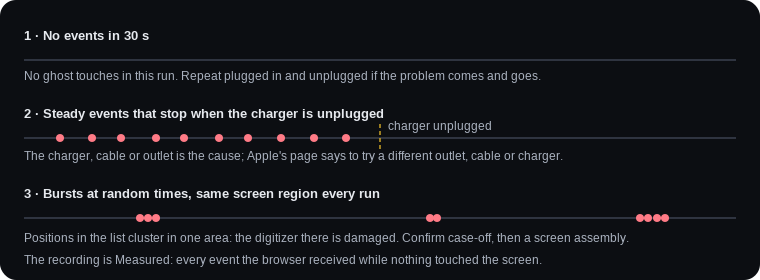
A count of zero means no ghost touches in that run, which is a measured fact about those thirty seconds and not a verdict on the device: if the problem comes and goes, repeat the recording at the moments it tends to happen, with the charger connected and again with it disconnected, with the screen protector on and again with it off. A count above zero is the problem caught in the act. The full test lists each event with its time and position, and the pattern is the diagnosis: events that appear only while charging point at the charger or cable, events that stop when the protector comes off point at the protector, events after rain or a shower point at moisture, and events clustered in one area of the screen in every run point at the digitizer under that area, which is hardware.
What causes ghost touch
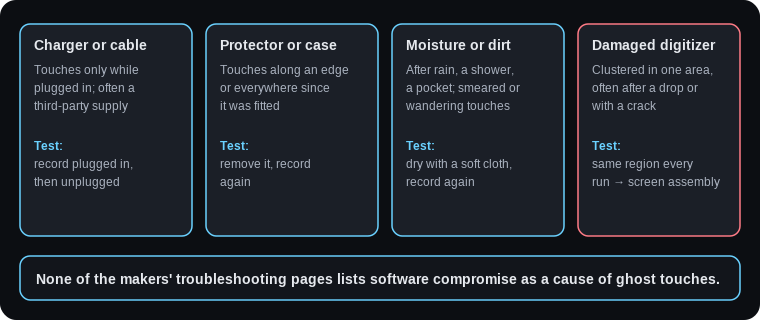
A capacitive touch screen senses the small change in an electric field that a fingertip causes, and anything that disturbs that field in the same way produces a touch. The makers’ troubleshooting pages name the disturbances they see most. Chargers and cables. Apple’s page for a screen that isn’t working says to disconnect any Lightning or USB-C accessories, and that if the screen works after removing an accessory, to try a different outlet, cable or charger (Apple: if the screen isn’t working on your iPhone or iPad); a charger with a noisy power supply couples that noise into the screen, and ghost touches that happen only while plugged in are the classic sign. Screen protectors and accessories. Samsung’s page lists screen protectors, cases and other accessories among the causes of touch problems and says to remove non-genuine accessories, offering a Touch sensitivity setting under Settings > Display for protectors (Samsung: troubleshoot touchscreen issues on a Galaxy device); Google’s page says to remove the case or screen protector to see if touch responsiveness improves, and offers Screen protector mode and Adaptive touch under Display & touch > Touch sensitivity on Pixel phones (Google: fix touch and response issues on your Pixel screen). A protector that has lifted at a corner or trapped a bubble or dust can register as a touch. Moisture and dirt. Samsung’s page names moisture or water on the screen as a cause and says to wipe the screen with a soft, dry cloth; Apple’s says to make sure the screen is clean and free of any debris or water; Google’s to make sure the screen is clean. Water is conductive, and a wet screen or a damp pocket taps itself. A damaged digitizer. A drop, a crack, pressure on the glass or a loose connector inside damages the sensing grid, and the damaged area then reports touches on its own; this is the cause when ghost touches sit in the same region in every recording whatever you remove or unplug, and it is the one that needs a repair.
Two things that are often blamed rarely are. Software updates do not change how the digitizer senses a finger, although an update can change the touch sensitivity defaults, which is why both Samsung and Google expose that setting; and low battery does not cause ghost touches, although the cheap charger reached for when the battery is low very often does. Keep the recorder’s evidence in front of the explanation: the cause is whatever makes the count drop to zero. If nothing you remove changes the count and the positions do not cluster, repeat the recording on another day before concluding anything; intermittent faults need two or three runs.
iPhone and iPad fixes
Apple’s steps, in Apple’s order, double as the experiments above: restart the iPhone or iPad; make sure the screen is clean and free of debris or water; disconnect any Lightning or USB-C accessories and, if that fixes it, change the outlet, cable or charger; remove cases and screen protectors; and if the screen still misbehaves, set up service (Apple). For an iPhone that is tapping itself so much that you cannot operate it, Apple’s force restart stops the storm long enough to work: on iPhone 8 and later, press and quickly release volume up, press and quickly release volume down, then hold the side button until the Apple logo appears; iPhone 7 holds the side and volume down buttons together; iPhone 6s and earlier hold Home and the side or top button (Apple: restart an unresponsive iPhone). Run the recorder after each change: after the restart, after unplugging, after removing the protector. If the count drops to zero after one of them, that was the cause. If it stays and the events cluster in one region, Apple’s last step applies, and the full test’s report, which records the count and the device class without personal data, is the thing to bring. iPad owners follow the same page; a tablet left charging on a desk with a cheap supply is the single most common ghost-touch case we hear of, and the first recording with the charger unplugged usually settles it.
Android and Samsung fixes
Samsung’s Galaxy page gives the order for most Android phones. Restart by holding the Side key and Volume down key together for more than seven seconds until the device restarts automatically. Remove non-genuine accessories and, if you use a protector, try turning Touch sensitivity on under Settings > Display, or remove the protector to test. Wipe the screen with a soft, dry cloth if there is any chance of moisture. Check accessibility settings: TalkBack under Settings > Accessibility changes how touches behave and can look like a haunted screen if it was switched on by accident; tap the switch to turn it off. Update the software under Settings > Software update > Check for updates and the apps through the Play Store. Run Samsung’s own diagnostic in the Samsung Members app: Support, Get started, Touch screen, then follow the instructions. Boot into safe mode, by holding Power and Volume down and then touching and holding Power off and tapping Safe mode, to see whether a third-party app is behind it; and reset as the last software step after a backup (Samsung). On a Pixel, Google’s page starts with removing the case or protector and cleaning the screen, then Touch diagnostics under Settings > Display & touch on Pixel 9 models, software updates, Adaptive touch or Screen protector mode under Touch sensitivity, and safe mode (Google). Use the recorder between steps as on an iPhone: it turns each step into a measurement, and a count that drops to zero after unplugging, uncasing or drying names the cause without guesswork.
Is it ghost touch or malware?
A phone that acts on its own feels like a phone being operated by someone else, and the fear that ghost touches mean a hacked device is common enough to deserve a straight answer. None of the makers’ troubleshooting pages for touch problems, Apple’s, Samsung’s or Google’s, lists software compromise as a cause of phantom touches; every cause they document is physical, a charger, a protector, moisture, an accessory, or damage. The recorder on this page is evidence in the same direction: the events it counts are touch events delivered by the screen’s own controller, the same events a finger produces, and they arrive with positions that follow the disturbance, a region of the glass or the whole screen while charging, rather than the purposeful taps a person would make. Remote control of a phone, where it exists, does not operate through the touch sensor at all. So the honest order of suspicion is the one the makers give: unplug, uncase, dry, restart, and only then think about software, and even then the maker’s safe mode is the test for a misbehaving app, not for an intruder. Two cautions keep this honest. This page cannot see what is installed on your phone and does not claim to clear it of anything; and if a device is doing things that are not touches, sending messages, making purchases or changing settings while the screen shows nothing, that is a different problem for the maker’s and your account provider’s security steps, not for a touch recorder. Ghost touches themselves are a hardware and accessory problem in the makers’ documentation, and they are fixed accordingly.
When to get the screen replaced
The decision is the same one the recordings lead to. If the ghost touches survive every removal, the charger, the case, the protector, the moisture, a restart and, on Android, safe mode, and the full test places them in the same region of the screen in run after run, the digitizer in that region is damaged and no setting will change it. Cracked glass, a recent drop, pressure on the screen in a bag, or a repair that left a connector loose are the usual histories, and a screen that also shows a dead band in the touch screen test’s grid has given the same answer twice. Replacement means the screen assembly, because the digitizer is bonded to the glass and on most modern devices to the display panel; the picture side of that assembly is checked separately by the dead pixel test. Take the full test’s PNG report to the maker or repairer: it records the ghost-event count, the grid result and the device class, and nothing personal. Before paying, two last checks are worth a minute: a protector or case you have had for years can have degraded without obviously lifting, and a different charger overnight settles the power question for good. What this guide will not suggest is any method involving heat, pressure, bending or tapping the screen; such advice is easy to find, no maker endorses it, and it turns a repairable screen into a broken one. The touch screen not working guide covers the other failure, a screen that ignores you rather than one that acts alone, with the same makers’ steps, and the input tests hub lists the touch test beside the keyboard, mouse and controller tests.
FAQ
What is ghost touch? Touch events the screen reports when nothing is touching it: apps opening, text typing, the cursor jumping on their own. The recorder above counts them over thirty seconds with your hands off the device; the full touch screen test lists each one with its time and position.
How do I fix ghost touch on an iPhone? Apple’s order: restart (force restart if it will not respond), clean the screen, disconnect any Lightning or USB-C accessory and change the outlet, cable or charger if that helps, remove the case and screen protector, and if it continues, service. Record between steps to see which one stops it.
How do I fix ghost touch on an Android phone? Samsung’s and Google’s pages: restart, remove the protector and case or turn on the touch sensitivity setting, dry and clean the screen, check accessibility settings such as TalkBack, update software, run the maker’s diagnostic, try safe mode, then reset. Same recorder between steps.
Why does my iPad ghost touch only while charging? Because the charger or cable is disturbing the screen; Apple’s page says to disconnect the accessory and, if that fixes it, use a different outlet, cable or charger. A recording plugged in and one unplugged proves it in a minute.
Does ghost touch mean my phone is hacked? No maker lists software compromise as a cause of ghost touches; their pages name chargers, protectors, moisture, accessories and damage. The events are produced by the touch sensor itself and follow a physical pattern. Device behaviour that is not touches, such as messages sent or purchases made, is a separate security matter.
Can a screen protector cause ghost touch? Yes, especially one that has lifted, trapped dust or does not suit the screen. Apple and Google say to remove it to test; Samsung and Google offer a sensitivity setting for protectors. Record with it off before deciding anything else.