How to Fix a Mouse That Double Clicks
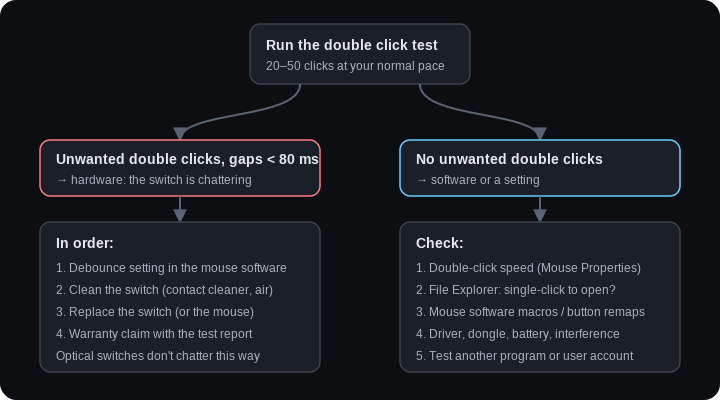
A mouse that double clicks when you click once opens two windows, drops files you were dragging and undoes selections, and it almost always has one cause: the microswitch under the button has worn to the point where its contacts bounce. This guide is how to fix mouse double clicking from the quick checks to the permanent repair, but the first step is to find out which kind of problem you have, because a setting can produce the same symptom. The mini test below (and the full double click test) tells you in twenty clicks: if it records presses closer together than any finger can manage, the switch is at fault; if it records none, look at the software causes first.
Test it first
Click the target below with the left button about twenty times at the pace you normally click. Two presses closer than 80 ms apart are counted as an unwanted double click, because no one clicks that fast on purpose; a deliberate double click is at least 150 ms between presses for most people. The box shows the count and the shortest gap it saw.
No unwanted double clicks yet.
Two presses closer than 80 ms count as one unwanted double click: no human clicks that fast on purpose. The shortest gap between your clicks is shown here.
Run the full double click test (all buttons, Windows speed check, report)A worn switch usually shows itself within twenty to fifty clicks, more often on light, quick clicks than on firm ones, and more often after the mouse has been in use for a while than cold. If nothing shows here but the problem is real, run the full double click test: it covers every button, records the gap of each unwanted double click, and has a Windows double-click speed mode that reproduces how the operating system decides what a double click is. Keep the result: the test’s PNG report is what you attach to a warranty claim, and running it again after each fix below tells you whether the fix worked, which is the only measure that matters here.
Software causes
If the test shows clean clicks, the mouse is sending one press per click and something between the mouse and the program is turning it into two, or making one click behave like two. These are the usual suspects on Windows, with the menu paths from Microsoft’s support pages.
Double-click speed. Windows decides that two clicks are a double click when they fall within a set time. If that time is set long, two separate clicks on the same item, a second or so apart, count as one double click and open it. Microsoft’s path: select Start > Settings > Bluetooth & devices > Mouse, then under Related settings select Additional mouse settings; in the Mouse Properties window, on the Buttons tab, move the Speed slider under Double-click speed toward Fast and select OK. The double click test’s Windows speed check mode uses the same logic so you can see the effect.
Single-click to open. File Explorer can be set to open items with a single click, which makes every folder “double click” by itself. Open File Explorer, select the three-dot menu on the toolbar, then Options; on the General tab, under Click items as follows, choose “Double-click to open an item (single-click to select)”. Microsoft’s Windows backup settings catalog lists these two options under File Explorer settings, which is where the wording comes from.
Mouse software. Logitech, Razer, SteelSeries and other vendor utilities can assign macros or alternate functions to a button, including a double click, and profiles switch with the application in focus. Open the software, check the left button’s assignment in every profile, and set it to the default click. If the software has a debounce or “click delay” setting, that is the hardware workaround covered below, and it belongs in the other branch.
Drivers, dongles and batteries. A wireless mouse with a weak battery or a dongle behind a metal case can drop and repeat events, which shows up in the test as gaps in the tens of milliseconds and often also as lost releases; the mouse tester reports those as “click drops”. Charge or replace the battery, move the dongle to a front port or an extension, and retest. Reinstalling the mouse driver is a last software step; on Windows the generic HID driver is almost always correct and vendor drivers rarely matter for the click itself.
Mouse software, continued: profiles and onboard memory. Many gaming mice store profiles on the mouse itself, so a remapped button follows the mouse to another computer and survives uninstalling the software. If the test is clean on one PC and the double clicking happens on another, or only after a profile switch, reset the onboard profile from the software’s settings page. Also check for a “turbo” or rapid-fire button mode, which some utilities offer and which produces exactly this symptom on purpose.
Another program or account. If the double clicking happens in one application only, that application is the cause; test in a text editor or on the desktop. If it happens in every application but not for a second user account on the same PC, a setting or utility in your profile is responsible.
Hardware cause: switch chatter, and how to fix mouse double clicking for good
Under each main button is a microswitch: a small metal spring that snaps between two contacts when the button is pressed, which is the click you feel and hear. Over millions of presses the spring loses tension and the contact surfaces oxidise or pit. A worn switch no longer closes cleanly; it closes, opens for a few milliseconds and closes again, and the mouse’s controller, which only sees the contact, reports two presses. That is chatter, and it is the same mechanism as a chattering keyboard switch.
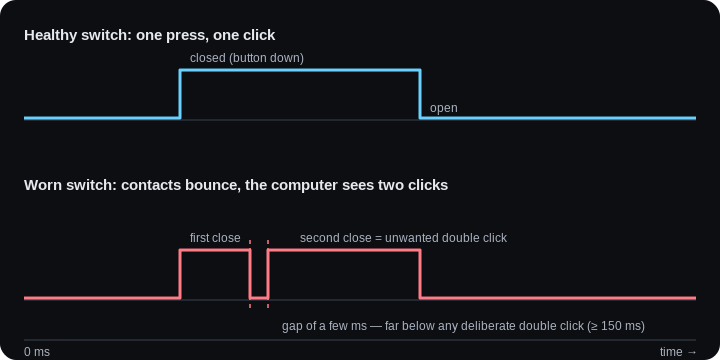
Every new switch bounces a little, which is why every mouse has debounce in its firmware: a short window after a press during which further changes are ignored. The gaming push toward lower click latency shortened those windows, sometimes to a few milliseconds, so a switch that is only slightly worn gets through, and some models became known for double clicking within a year or two of purchase; “Logitech mouse double clicking” is a common search for that reason, though the switches involved are used by most brands. It is wear, not a defect of one manufacturer, and the fixes are the same everywhere: lengthen the debounce window, restore the contact, or replace the switch. In that order, from least to most effort.
Debounce setting in mouse software
Several vendors expose the debounce window as a setting, because it is the cheapest fix for a switch that has started to chatter. Look in the mouse’s software for debounce, click delay, double-click protection or a similar name, raise it in steps and rerun the test after each: the unwanted double clicks disappear once the window exceeds the switch’s bounce time, typically at 8 to 16 ms. The cost is click latency equal to the window, which only matters in games that reward the fastest click. Some mice also accept a firmware update that changes the default; check the vendor’s download page for your model. If your mouse has no such setting, a system-wide utility can filter double clicks in software; download one only from its official page, and treat it as a stopgap, since the switch continues to wear and the window will need to grow.
Cleaning the switch
Oxidation and debris on the contacts cause a share of chatter, and cleaning restores those switches for weeks or months. The gentle version needs no tools: with the mouse unplugged, hold the button down and blow compressed air around the button’s edge, then click it rapidly a hundred times to scrub the contacts against each other. The thorough version opens the mouse (screws are usually under the feet or a sticker), and applies a small amount of electrical contact cleaner into the switch’s actuator slot while clicking it, then lets it dry fully before reassembly. Don’t use oil, WD-40 or anything that leaves a film; contact cleaner evaporates completely. Retest afterwards.
If you open the mouse, take three precautions. Photograph the inside before touching anything, because the scroll wheel encoder and its spring fall out easily and only go back one way. Unplug a wired mouse and remove the battery from a wireless one, since contact cleaner is flammable and the circuit board carries power. And keep the feet: on most mice the screws hide under the glide pads, which can be peeled back with a thin blade and pressed down again, but tear easily; replacement feet are cheap and worth ordering before you start if the pads are old. If cleaning helps for a while and the double clicking comes back, the spring has lost tension, and cleaning won’t help again.
Replacing the switch
The permanent fix for a mechanical switch is a new one. Main-button switches are a standard size and a standard footprint on almost every mouse, cost a few dollars each, and are swapped by desoldering three pins and soldering the new switch in; a repair shop does it in minutes and many people do it at home with a basic iron. If you replace, replace both main buttons, since the other is the same age and will start chattering a few months behind the first. Some mice have socketed switches that pull out and push in with no soldering; the vendor’s page or a teardown will tell you.
Optical switches are the alternative that removes the problem. Instead of metal contacts they interrupt a light beam, so there is nothing to bounce or oxidise, and a mouse built with them cannot develop this fault; they are available on a growing number of models from most major brands. When a mouse has double clicked itself out of warranty and a repair isn’t worth paying for, replacing it with an optical-switch model is the choice that doesn’t repeat the cycle.
Warranty
A mouse that double clicks within its warranty period is defective and the manufacturer replaces it; most major brands cover their mice for one to two years and some for longer, and the terms are on the manufacturer’s own support page for your model, which is the only place to trust for the period. Claims go faster with evidence: run the full double click test, let it record a few unwanted double clicks with their gaps, and download the PNG report; attach it with a short description (“left button registers two presses 5–20 ms apart, see attached test”). Retailers also accept returns in their own window, often with less friction than the manufacturer. Don’t open the mouse before the claim is settled, since a broken seal gives the manufacturer a reason to refuse.
Two things make a claim smoother. Keep the proof of purchase, since the warranty period counts from that date, not from when the fault appeared. And describe the fault in the manufacturer’s own terms: “the left button registers a double click on a single press” is understood immediately by every support desk, because it is one of the most common tickets they see, and it usually goes straight to replacement without a troubleshooting script.
FAQ
Why does my mouse double click on a single click? The microswitch under the button has worn and its contacts bounce, so one press registers as two. The test above shows it as presses a few milliseconds apart. Less often it is a setting: a long double-click speed, single-click-to-open in File Explorer, or a macro in the mouse software.
Can a double-clicking mouse be fixed without opening it? Sometimes. Raising the debounce setting in the mouse software hides the bounce at the cost of a few milliseconds of latency; compressed air and rapid clicking can clean lightly oxidised contacts. Both are temporary if the spring itself has weakened with age.
Does the double click test work with a touchpad or a Mac? Yes. A touchpad’s physical click is a switch like any other and can chatter; tap-to-click is software and doesn’t. On macOS the same hardware fault shows in the test; the system setting that matters is the double-click speed under System Settings > Accessibility > Pointer Control, and there is no single-click-to-open option to check.
Is a double-clicking mouse dangerous to keep using? Not dangerous, but costly: it drops drags, double-submits forms and misfires in games. A debounce workaround makes it usable until you repair or replace it.
Will a new mouse of the same model do the same thing? If the model is known for it, probably, in time. A model with optical switches, or one whose vendor exposes a debounce setting, avoids the problem; otherwise plan on the switch lasting as long as its rated life under your clicking.
My mouse double clicks only sometimes. Is that still the switch? Yes; intermittent is how chatter starts. It depends on how hard and fast you click, on temperature and on how recently the mouse was used. The test records it when it happens, so run it for fifty clicks rather than ten.
Why does the double clicking happen when I drag, not when I click? Dragging holds the button down for a long time, and a weak switch spring can let the contact open for an instant while you move, which ends the drag and starts a new click. The mouse tester records that as a lost release (“click drop”) rather than a double click; it is the same worn switch and the same fixes apply.
Does a higher polling rate make double clicking worse? No, but it can make it visible sooner: a mouse that reports 1,000 or more times a second passes a short bounce on to the computer, where a slower one might have missed it. The polling rate is not the cause and lowering it is not a fix; the debounce window is the setting that matters.
Can I fix a double-clicking mouse with a registry setting or a script? Not the hardware. System-wide filters only drop the second press when it arrives inside a window you choose, which is the same idea as the debounce setting with the same latency cost. They help if your mouse’s software offers no debounce control, and they stop helping as the bounce grows longer.