Best DPI for Gaming (and Why eDPI Matters More)
The best DPI for gaming is a less important number than the question implies, and the people who answer it with a single figure are answering the wrong question. DPI is how many counts your mouse reports per inch of movement; it is multiplied by the game’s sensitivity setting, and the product, eDPI, together with the game’s own scale, is what decides how far your hand moves to turn around. Two players with “different DPI” can have identical aim settings, and two with the same DPI can be a world apart. This guide starts by measuring what your mouse actually sends with the DPI analyzer, because the number in the software is not always the number on the desk, then explains DPI, sensitivity and eDPI in one picture, gives the measured ranges professionals use in the games where that data is published, settles 400 versus 800 versus 1600, deals with high-resolution monitors, and ends with a method for finding your own setting that does not involve copying anyone.
Best DPI for gaming starts with your real DPI
Before choosing a number, find out what you have. Mice do not always deliver their nominal DPI: sensors are specified with a tolerance, firmware rounds, some models run slightly fast or slow at particular settings, and a DPI button pressed by accident puts you on a stage you did not choose. The DPI analyzer measures the real figure: you move the mouse a known distance (a ruler on the desk, or the width of a mouse pad you have measured) with pointer acceleration off, and the page counts the raw movement the browser receives and divides. A mouse set to 800 that measures 780 is behaving normally; one that measures 1,600 is on the wrong stage, and one that measures different values on repeated passes has a sensor or surface problem that the mouse not working guide covers. The measured value is the one to put into every calculation below, because an eDPI computed from a nominal DPI that is 10 % off is 10 % off too, which is enough to feel.
DPI vs sensitivity vs eDPI
Three terms, one relationship. DPI (dots per inch, strictly counts per inch) is the mouse’s resolution: how many movement reports it sends for each inch the sensor travels. It is set in the mouse’s software or with a button on the mouse and it is a property of the mouse alone. Sensitivity is the game’s multiplier applied to each count: a sensitivity of 2 turns the view twice as far per count as a sensitivity of 1, and the scale differs by game, which is why “sensitivity 2” means different things in different titles. eDPI (effective DPI) is DPI multiplied by the game’s sensitivity, and within one game it is the complete description of how far the view turns per inch of hand movement; the eDPI calculator does the multiplication and converts it to cm/360, the centimetres of mouse travel for a full turn, which is the one figure that transfers between games because it removes the game’s scale.
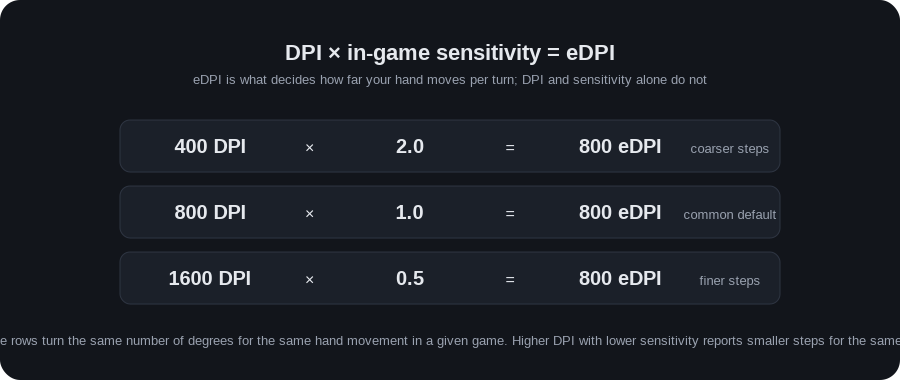
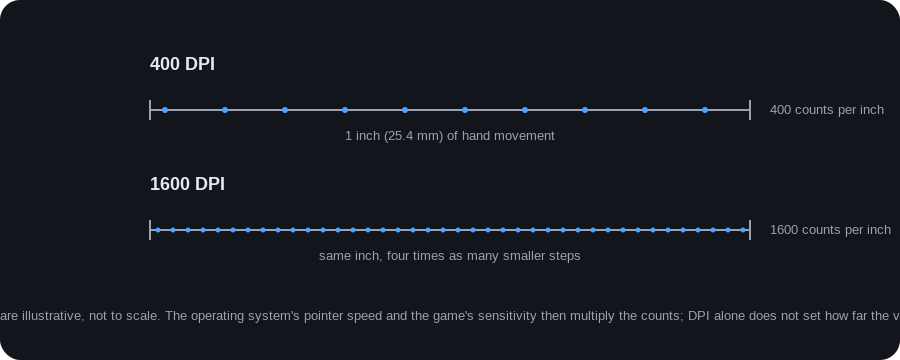
The consequence is the point of this guide: 400 DPI at sensitivity 2.0, 800 at 1.0 and 1600 at 0.5 all give 800 eDPI and all turn the same number of degrees for the same hand movement. What differs between them is the size of the smallest step: at 1600 DPI each count moves the view a quarter as far as at 400, so the same turn is made of four times as many smaller increments. Whether that is noticeable depends on the game’s engine and on how fine the steps already are, which is the substance of the 400/800/1600 debate below. The operating system’s pointer speed is a third multiplier for the desktop and for games that read the cursor rather than raw input; competitive games read raw input and ignore it, and the DPI analyzer asks you to turn off “Enhance pointer precision” because that acceleration breaks the measurement.
Typical ranges by genre (sourced)
Honest numbers come from datasets, not from forum memory, and they exist for a few games. The figures below are the ones the eDPI calculator carries, with their sources and dates; they are community-aggregated settings of professional players, not developer data, and they describe what pros use, not what you should. For Valorant, senslab.pro’s dataset of 605 professional players (as of 19 October 2026) has a median of 224 eDPI with the middle half of players between 184 and 280; Valorant’s scale is small, so these are low absolute numbers. For Counter-Strike 2, csdb.gg’s Data Lab of 820 active professionals (same date) has a median of 800 eDPI with the middle half between 707 and 960. Both convert to a similar hand movement: a full turn in roughly 30 to 45 cm, which is what “low sensitivity” means in tactical shooters, where precise small corrections matter more than fast turns and the arm, not the wrist, does the aiming. Games where the data is not published in a form we can cite are not given numbers here; the general pattern in the shooter community is that tactical shooters sit at the low end, battle-royale and hero shooters somewhat higher, and third-person and controller-style games higher still, because the mix of tracking and flicking differs. Treat any precise “best eDPI for game X” figure without a dataset, a sample size and a date as someone’s opinion dressed up as a measurement.
Two cautions about pro settings. Professionals have thousands of hours on one setting and large mouse pads; their numbers are the result of practice, not the cause of their skill, and copying one puts you on a setting tuned for a different hand, desk and monitor. And the dataset medians move slowly over years as games and metas change, which is why the calculator carries the date and will drop a figure whose source goes stale rather than keep it.
400 vs 800 vs 1600 DPI
Given equal eDPI, the DPI choice is about step size, and the practical argument has shifted over the years. 400 DPI was the historical standard because early sensors were most accurate there and because the games of the time had coarse internal scales; it still works, and at low eDPI the steps are fine enough that most players notice nothing. 800 DPI is the most common modern choice and a sensible default: it halves the step size of 400 with no downside on current sensors, and most games’ sensitivity scales are set so that familiar numbers land around it. 1600 DPI halves the step again; in games whose engines handle fine input well, slow micro-adjustments feel smoother, and some players report a difference in tracking; the cost is that the desktop cursor becomes fast unless the operating system’s pointer speed is lowered, and in older games with coarse scales very low sensitivity values may hit the bottom of the slider or round badly. Above 1600 the gains are theoretical for most people on most sensors and in most games, and a few games introduce rounding artefacts at very low sensitivity values. The sensor itself is not more accurate at any particular setting on modern mice; “native DPI” as a source of accuracy belongs to an earlier generation of sensors.
The honest recommendation: pick 800 unless you have a reason, go to 1600 if you play games whose engines reward fine input and you are willing to lower the desktop pointer speed, keep 400 if you have used it for years and it is not holding you back, and in every case set the game’s sensitivity so that your eDPI and cm/360 stay the same across the change; that is the entire adjustment, and the calculator does the arithmetic.
High-res monitors and DPI
A common question is whether a 1440p or 4K monitor needs a higher DPI. In games, no: the view turns by degrees per count regardless of how many pixels show the scene, so a given eDPI produces the same turn on any monitor, and a higher resolution does not change the hand movement for a flick. What changes is the desktop: at 4K, a cursor at 800 DPI crosses the screen more slowly in pixel terms, which is why many people raise DPI or the pointer speed for desktop use and then find their games too fast, or run two DPI stages, one for the desktop and one for games, which the DPI button does well. The other place resolution enters is field of view and aspect ratio: a wider field of view makes the same turn look slower on screen, which some players compensate for with a slightly higher eDPI; that is a perception effect, not a DPI effect, and it is better handled by adjusting sensitivity per game than by changing DPI. One more interaction with the monitor is size rather than resolution: a larger screen at the same distance makes targets larger on your retina, and some players find a slightly lower eDPI comfortable on a big display because small corrections are easier to see; again, a sensitivity matter rather than a DPI one. Refresh rate does not interact with DPI at all; the mouse polling rate test shows the rate at which your mouse reports, which is the figure that should be at or above the frame rate for smooth motion.
Mouse acceleration, raw input and smoothing
Two settings undo any care you take over DPI. Pointer acceleration makes the distance the view turns depend on how fast you moved the mouse, not only how far: a quick flick travels further than the same distance moved slowly, so the hand can never learn a fixed relationship between movement and turn. On Windows it is “Enhance pointer precision” in the Mouse Properties window’s Pointer Options tab (Settings › Bluetooth & devices › Mouse › Additional mouse settings), and it is on by default; competitive games that read raw input bypass it, but the desktop, the DPI analyzer’s measurement and games that read the cursor do not, so turn it off. macOS applies acceleration to the pointer by default as well, and games that read raw input ignore it; the system setting for it is not exposed in the normal preferences. Raw input in a game’s settings means the game reads the mouse directly rather than through the operating system’s pointer, which removes the OS acceleration and pointer speed from the chain; leave it on where it exists. Smoothing and angle snapping in mouse software or in-game average or straighten small movements; both make tracking feel vague and should be off for aiming. With all three settled, DPI times sensitivity is the whole story, which is what makes the eDPI arithmetic trustworthy.
Aim style, arm versus wrist, and the mouse pad
The right eDPI depends on how you move. Arm aiming, with the wrist planted and the forearm sweeping, suits low eDPI and large cm/360 values, around 30 cm and up, because large movements are precise and small corrections come from the fingers; it needs a big pad, typically 40 cm or more across, and a chair and desk that let the arm move freely. Wrist aiming, with the arm still and the hand pivoting, suits higher eDPI and shorter cm/360, 20 cm or less, because the wrist’s range of motion is small; it needs less space and tires differently. Most players use a mix, and the sourced pro ranges above are populated by arm-heavy players in games where that style pays. The mouse pad is the physical limit on cm/360: if a full turn needs 40 cm and the pad is 30 cm wide, you will lift and reposition mid-turn, which is a real cost, and the fix is a bigger pad or a slightly higher eDPI rather than a different DPI. The pad’s surface also interacts with the sensor: a worn, shiny patch in the middle of an old pad causes tracking errors that feel like a bad sensitivity setting, and the mouse tester’s movement area shows an erratic trail on such a surface where a fresh pad shows a smooth one.
Changing DPI without losing your aim
If you decide to move from 400 to 800, or 800 to 1600, do it so that nothing else changes. First, record the current DPI, in-game sensitivity, eDPI and cm/360 from the eDPI calculator. Second, change the DPI in the mouse software and verify the new value with the DPI analyzer, because a stage that is nominally 1600 may measure a little off, and the correction should use the measured number. Third, set the new in-game sensitivity to the value that keeps the eDPI the same (halve it when doubling DPI, with the measured correction), in every game you play. Fourth, lower the operating system’s pointer speed so the desktop feels the same, or set a second DPI stage for the desktop. Fifth, play a session and resist the urge to fiddle: if the eDPI is genuinely unchanged, the only difference is step size, and any sense that the mouse “feels faster” in the first minutes is the desktop cursor and the new stage’s rounding, not your aim. A week later, compare how slow tracking feels; that is the honest test of whether the finer steps did anything for you.
Common mistakes
Copying a professional’s DPI without their sensitivity, which copies nothing. Comparing eDPI across games with different scales, which is meaningless without cm/360. Changing DPI and sensitivity at the same time, which makes it impossible to know what helped. Leaving pointer acceleration on and then tuning sensitivity around it. Measuring DPI with acceleration on, or with a mouse pad whose width you guessed. Chasing a setting every session instead of giving each change a week. Treating a very high DPI as a quality signal when buying a mouse; sensors are sold by their maximum DPI because it is an easy number, and the figures that matter for aim are tracking accuracy at normal speeds, the absence of smoothing, and the polling rate, which the mouse polling rate test estimates and the double click test complements by catching a main switch that fires twice, the fault that ruins more games than any DPI choice.
Controllers, consoles and games without a DPI
DPI is a mouse concept, and the question changes shape elsewhere. On a controller the equivalent knobs are the stick sensitivity and response curve in the game and the deadzone, which the stick drift test helps set from a measurement rather than a guess; there is no DPI to measure, and “sensitivity” there is a curve, not a multiplier. On a console with mouse support, the mouse’s DPI still applies but the console’s own sensitivity setting and any acceleration it imposes are usually fixed or coarse, so matching a PC cm/360 exactly is rarely possible. In games that do not expose a numeric sensitivity (a slider from 1 to 10, say), the eDPI arithmetic still works in principle, but the per-step scale is unknown, and the practical method is the empirical one in the next section: start from a cm/360 you know from another game, estimate the slider position, and adjust by feel over a week. The constant across all of these is the body: the hand movement for a full turn is what you have trained, and carrying that number, not a DPI, is what preserves your aim.
Finding your own setting
A method that takes an hour and produces a setting you can defend. First, measure your real DPI and set it to 800 (or 1600 with the desktop adjusted). Second, pick a starting cm/360 in the range the sourced data suggests for your genre, around 35 cm for a tactical shooter, and use the eDPI calculator to turn it into a sensitivity for your game. Third, play a training routine or a few matches and watch for two failure modes: overshooting small corrections and feeling cramped on turns means too high; undershooting and running out of mouse pad means too low. Fourth, change by small steps, about 10 % at a time, and give each step at least a session; the hand adapts over days, and a setting that feels wrong for an hour may be right for a month. Fifth, once it feels neutral, stop changing it, write down the DPI, sensitivity, eDPI and cm/360, and carry the cm/360 to every other game with the calculator so that your aim transfers. Finally, check the hardware around the setting: a mouse pad large enough for your cm/360 plus a margin, a polling rate that does not stutter, a double-click test that shows the main button is not firing twice, and the DPI analyzer run again after any firmware update. The number you end with is the best DPI for gaming for you, which is the only version of the question that has an answer. The sensitivity converter carries a cm/360 between the listed games in one step.
FAQ
What is the best DPI for gaming? There is no single best DPI, because the game’s sensitivity multiplies it; 800 is the most common modern choice and a sensible default, 1600 gives finer steps for games that handle them, 400 is the historical standard. Choose by eDPI and cm/360, then pick the DPI that keeps the desktop usable.
Is higher DPI better for gaming? Higher DPI gives smaller movement steps, which can feel smoother in slow adjustments if the game’s engine handles fine input well; it does not make aim more accurate by itself, and above 1600 the gains are theoretical for most players. Keep eDPI constant when you change DPI.
What eDPI do pros use? In the published datasets the eDPI calculator carries, Valorant professionals have a median of 224 eDPI (middle half 184–280, 605 players, senslab.pro, 19 October 2026) and Counter-Strike 2 professionals a median of 800 (707–960, 820 players, csdb.gg, same date). Both correspond to roughly 30–45 cm per full turn.
Should I change DPI for a 4K monitor? Not for games: a turn is degrees per count, independent of resolution. For the desktop, a higher DPI stage or pointer speed makes the cursor usable at 4K; many players use two DPI stages for that reason.
Why does my measured DPI differ from the setting? Sensor tolerance, firmware rounding, a wrong DPI stage, or pointer acceleration left on during the measurement. A few percent is normal; a large difference is the stage or the acceleration. Use the measured value in the eDPI calculation.
How do I keep the same sensitivity across games? Use cm/360: compute it from your DPI and sensitivity in one game with the eDPI calculator, then solve for the sensitivity that gives the same cm/360 in the next game. The calculator does both directions with sourced per-game scales.
Does polling rate affect DPI? No. DPI is counts per inch; polling rate is how often those counts are reported. A higher polling rate makes motion smoother and more timely, which the polling rate test estimates, but it does not change how far the view turns.