Hall Effect Keyboards Explained: Rapid Trigger, Actuation & Are They Worth It?
A hall effect keyboard senses how far each key is pressed instead of whether it is pressed, which is what the rapid trigger test measures the effect of. A conventional mechanical switch closes two metal contacts at one fixed depth; a magnetic switch carries a magnet in its stem and a Hall sensor under it, and the keyboard reads the stem’s position continuously, from the top of the travel to the bottom. Everything that makes these keyboards interesting follows from that one fact: the actuation point becomes a setting rather than a property of the switch, a key can register a release the moment it starts to rise (rapid trigger), two keys can be made to behave together (snap tap), and there are no contacts to bounce or wear. This guide explains the mechanism, the features in plain terms, how the keyboards compare with mechanical and optical boards, and who actually benefits; the test measures the effect on your own fingers, with the feature on and off.
How a hall effect keyboard’s magnetic switches work
The switch looks like a mechanical one from above and feels like a linear switch under the finger: a stem, a spring, a housing. Inside, instead of a pair of contact leaves, there is a small magnet at the bottom of the stem, and on the keyboard’s circuit board under each switch there is a Hall effect sensor, a chip whose output voltage changes with the strength of the magnetic field through it. As the key goes down the magnet approaches the sensor, the field at the sensor increases, and the keyboard’s controller converts the voltage to a position in fractions of a millimetre. The controller scans every sensor many times a second and decides, in firmware, what counts as a press and a release. Because the decision is made in software from a continuous position, the manufacturer can expose it as settings: at what depth a key actuates, at what depth it resets, whether those depths are fixed or relative to the key’s current position, and what should happen when two particular keys are down together.
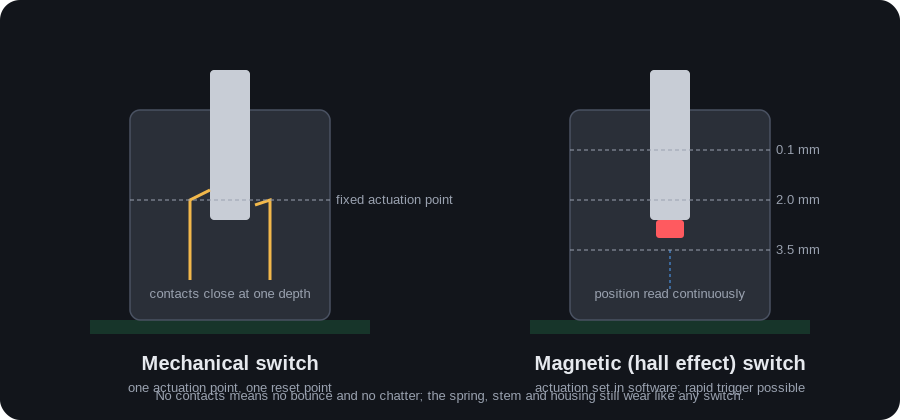
Three consequences matter for how the keyboard behaves. There are no contacts, so there is no contact bounce and therefore no chatter in the mechanical sense; the chatter test explains why magnetic and optical switches do not double-type the way worn mechanical switches do, and what can still cause a double registration on them. The switch’s feel is purely spring and stem, so almost all magnetic switches are linear; tactile magnetic switches exist but are rare. And the sensor needs a controller that can read dozens of analog values quickly, which is why these keyboards tend to be built on faster controllers with higher polling rates, which the polling rate test estimates within the limits of a browser’s timer.
Adjustable actuation
On a mechanical switch the actuation point is wherever the contacts close, typically about 2 mm into a 4 mm travel for a standard switch and around 1.0 to 1.5 mm for the “speed” variants, and it is the same for every key for the life of the board. On a magnetic keyboard it is a number in the software, per key, often anywhere from a tenth of a millimetre to nearly the full travel. A short actuation makes a key fire at a touch, which is quick for movement keys in games and unforgiving for typing, where resting a finger becomes a keystroke; a long actuation makes a key deliberate, useful for keys you must not hit by accident. Setting different depths for different keys is the practical win: a hair trigger on WASD, a deep actuation on the key that drops your weapon, a middle value for typing. Some boards go further and let one key do two things at two depths (a light press walks, a full press runs), which is only possible because the position is known throughout the travel.
The number to watch when comparing boards is not the headline minimum actuation but the consistency and the reset. A board that actuates at 0.1 mm but resets only when the key returns to the top is slower for repeated presses than one with a sensible reset distance, which is what the next feature changes.
Rapid trigger and snap tap
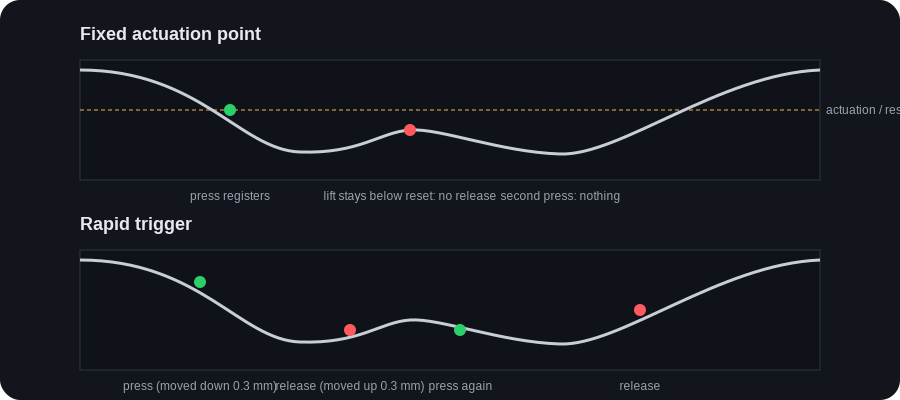
Rapid trigger removes fixed actuation and reset points altogether. Instead of registering a press when the key crosses a depth, the keyboard registers a press whenever the key moves down by a set distance from wherever it is, and a release whenever it moves up by a set distance from wherever it is. A key held halfway down can be released by lifting a fraction of a millimetre and pressed again by pushing a fraction of a millimetre, with no dead zone to cross and no need to return to the top. The effect is that repeated presses and quick reversals are limited by the finger rather than by the switch’s travel. The counter-strafe test measures exactly that: the time to press the same key again after releasing it, and the gap or overlap when switching between two keys as in a counter-strafe, with the feature on and off for comparison.
Snap tap, also sold as SOCD handling (a term from fighting-game controllers for “simultaneous opposite cardinal directions”), is a different feature that only happens to ship on the same keyboards. It changes what the keyboard sends when two designated keys, usually A and D, are down at the same time: instead of reporting both, it reports only the most recently pressed one and releases the other, so a movement reversal in a game is instant even if the first finger has not lifted. Rapid trigger changes one key’s own timing; snap tap changes the relationship between two keys. The distinction matters because games treat them differently: the rapid trigger test’s page quotes Valve’s 2024 Counter-Strike 2 notes, under which hardware-assisted counter-strafing is detected on official servers and results in a kick, while rapid trigger, as a property of a single key, is not named. Check the rules of what you play before enabling snap tap; the test shows you whether your keyboard is applying it, because a run with no overlaps at all and gaps of a few milliseconds is the signature.
Hall effect vs mechanical vs optical
Mechanical switches close metal contacts; they come in linear, tactile and clicky, have fixed actuation, bounce (hence debounce delay and, when worn, chatter), and offer the widest choice of feel, including the tactile and clicky kinds magnetic boards mostly lack. Optical switches interrupt a light beam in the stem; like magnetic switches they have no contacts and no bounce, and some optical designs also read position continuously and offer adjustable actuation and rapid trigger, while simpler ones are a fixed-point switch with a light instead of a contact. Magnetic (hall effect) switches read position continuously by design, which is what enables per-key actuation, rapid trigger, snap tap and dual-depth keys. In latency terms the three are close once debounce is removed from the mechanical switch’s path; the differences people feel come from actuation distance and reset behaviour rather than from the sensing method, and from the keyboard’s controller and polling rate, which vary more between boards than between switch types. For typing feel, mechanical boards win on variety; for configurable behaviour, magnetic boards win outright; optical sits between, depending on the design. The mechanical keyboard switches guide has the mechanical side in detail, with datasheet figures.
Two practical differences: magnetic switches are not interchangeable with mechanical ones, since the board needs a sensor under each switch and the switch needs a magnet, so hot-swap on a magnetic board means other magnetic switches; and magnetic boards depend on their firmware and configuration software far more than a mechanical board does, so a maker that stops updating leaves the board’s best features frozen.
Latency: what changes and what does not
Magnetic switches are sold on speed, and it helps to separate the parts of a keystroke the sensor can shorten from the parts it cannot. The mechanical part, how far the finger has to move before the key registers and how far it has to rise before it can register again, is where a magnetic switch wins: a short actuation and rapid trigger cut both distances to fractions of a millimetre. The electronic part, the time from the switch deciding “pressed” to the computer receiving the report, depends on the keyboard’s scan rate, its polling rate and the connection, none of which is a property of the switch; a magnetic board with a slow controller or a Bluetooth link is slower than a wired mechanical board with a fast one. Debounce is the one electronic delay a magnetic switch removes outright, since there are no contacts to debounce, which is typically a few milliseconds on a mechanical board. The keyboard latency test measures the whole chain through a reaction run and lets you compare two keyboards or two connections honestly; the report-rate estimate estimates the report rate within the browser’s timer limits. Expect the measurable gains to be in the mechanical part, and expect them to be small in absolute terms: a millimetre of travel at a typing speed is a few milliseconds, which is why the feature matters for repeated presses and reversals and barely at all for a single press.
Setting up a hall effect keyboard: a sane starting profile
The temptation with a new magnetic board is to set everything to the minimum. A better first week: leave typing keys at a standard actuation around 1.5 to 2 mm with rapid trigger off or at a conservative distance, so the board behaves like a familiar mechanical keyboard while you learn its feel; set movement keys (WASD or the arrows) to a shorter actuation, around 0.5 to 1 mm, with rapid trigger on at a moderate distance, and run the rapid trigger measurement before and after to see the same-key re-press and the switch gap change; leave keys that are expensive to press by accident (drop, reload, push-to-talk, the Windows key) at a long actuation or disabled in game profiles; and keep snap tap off until you have read the rules of the games you play, then enable it only where it is allowed and only on the pair of keys it is for. Save the result as a profile per game. Revisit the typing keys after a week: many people end up lowering them a little once the lack of bounce feels normal, and the chatter test confirms that a shorter actuation has not started producing doubles from a shaky finger.
Durability and the magnet
Without contacts, the wear items in a magnetic switch are the spring, the stem and the housing, which age the same way as in any switch: smoothness changes, a spring can ping or sag, dust finds its way in. The magnet itself does not wear in use, and the sensor is a solid-state part on the board, so the sensing path is the most durable part of the switch rather than the least, the reverse of a mechanical switch where the contacts fail first. Two cautions follow from the physics. A strong external magnet near the board, a magnetic phone mount, a wrist rest with magnetic fasteners, a speaker, can shift the sensors’ readings, which shows up as keys registering on their own or failing to reset until the magnet is moved; and a board that is recalibrated with something magnetic nearby stores the wrong zero. The keyboard tester shows a key held or registering spontaneously as a stuck or chatter suspect, which on a magnetic board is the sign to look for a magnet before suspecting the switch.
Who should buy one
Buy one if you play games where movement precision and repeated taps matter and you will actually set the actuation and rapid trigger values per key; that is the use these keyboards were designed for and where the gap/overlap test will show a measurable difference in your own hands. Consider one if you type a lot and prefer a linear feel, because the lack of bounce and the per-key depth are pleasant, with the caveat that a short actuation set for games will make you mistype until you raise it for the letter keys. Skip it if you want tactile or clicky switches, if you need a specific layout or keycap set that the few magnetic boards do not offer, or if the games you play forbid the keyboard-side features that are the point of the purchase. And whichever you have, test it rather than trust the box: the key tester shows every key registering, the latency test compares connections, the chatter test confirms the no-bounce claim, and the rapid trigger test turns the marketing into a number.
FAQ
What is a hall effect keyboard? A keyboard whose switches contain a magnet and whose circuit board has a Hall sensor under each key, so the keyboard reads how far every key is pressed rather than whether a contact has closed. That makes the actuation point adjustable per key and enables rapid trigger and snap tap.
Is rapid trigger the same as a hall effect keyboard? No. Rapid trigger is a firmware feature that needs continuous position sensing, which magnetic (and some optical) switches provide. A hall effect keyboard can run with rapid trigger off, and some optical keyboards offer it.
Do hall effect keyboards have chatter? Not in the mechanical sense: there are no contacts to bounce. A double registration on a magnetic board comes from a very short actuation distance combined with a shaky finger or a dirty stem, and raising the actuation or reset distance removes it. The chatter test tells the two apart.
Are hall effect keyboards faster? Their switches can be set to actuate earlier and reset sooner, which shortens the mechanical part of a keystroke; the electronic latency is similar to a good mechanical board. The rapid trigger test measures same-key re-press time, which is where the difference shows.
Can I use hall effect switches in a normal mechanical keyboard? No. The sensor sits on the board, not in the switch, so magnetic switches only work in boards built for them, and a magnetic board’s hot-swap sockets take other magnetic switches.
Is snap tap allowed in games? It depends on the game. Valve’s Counter-Strike 2 release notes of August 2024 state that hardware-assisted counter-strafing is detected on official servers and results in a kick. Check each game’s and tournament’s rules; the rapid trigger test shows whether your keyboard is applying snap tap.
Are tactile hall effect switches available? A few, but most magnetic switches are linear, because the feel comes only from the spring and stem. If you want a tactile bump or a click, a mechanical board remains the better choice.