Hall Effect Controllers: Do They End Stick Drift?
A hall effect controller replaces the part of a thumbstick that wears out, and the stick drift test is how you check whether yours has started to. In a conventional stick, two potentiometers turn the stick’s position into a voltage by dragging a metal wiper across a carbon track, and the track wears; in a hall effect stick, a magnet on the stick moves over a fixed sensor that reads the magnetic field, and nothing touches. That single change removes the cause of the drift that eventually afflicts almost every potentiometer controller, which is why “hall effect” has become a selling point. It does not make a stick immortal, and this guide is about the difference between the two claims: what the magnetic sensor fixes, what it does not, how TMR fits in, what to look for when buying, and how to measure any controller you own with the test, which reads the resting position of each stick to a few thousandths and tells you whether what you have is drift or a deadzone question.
How hall effect sticks work
The Hall effect is the voltage that appears across a conductor carrying a current when a magnetic field passes through it, proportional to the field’s strength. A hall effect stick puts a small permanent magnet on the moving part of the stick and a Hall sensor on the circuit board beneath or beside it; as the stick tilts, the magnet moves, the field at the sensor changes, and the sensor outputs a voltage the controller converts to a position. Two sensors (or one two-axis sensor) give X and Y. Because the magnet never touches the sensor, there is no contact to wear, and the relationship between position and output is set by geometry and magnet strength rather than by the condition of a resistive track. The controller still has to calibrate the sensor once (the resting field is the zero point) and the sensor has a little electrical noise, which is why even a new hall effect stick reads a small nonzero value at rest; the test shows that as a fraction of a percent and the controller’s deadzone hides it.
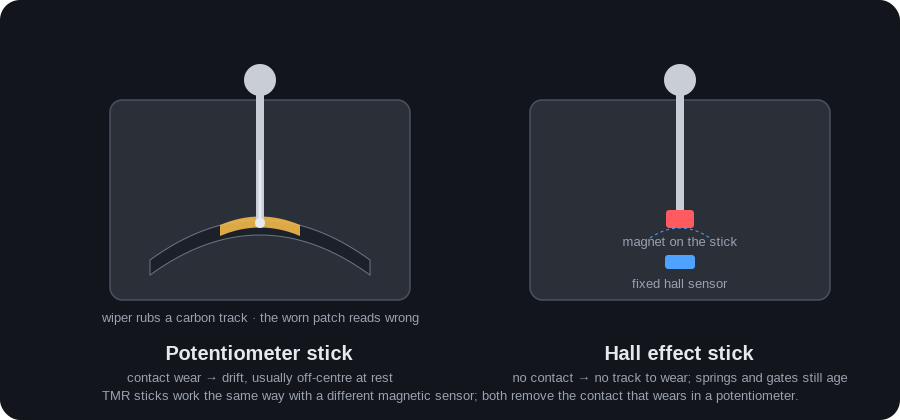
A potentiometer stick does the same job with a different transducer. The stick turns a wiper across a curved resistive track; the voltage at the wiper tells the controller where it is. The track is carbon on a plastic substrate, the wiper is a spring-loaded metal finger, and every movement scrapes one across the other. The region around centre takes the most scraping because the stick spends most of its life there, so that is where the track thins first, the resistance changes, and the centre reading creeps away from the value the controller was calibrated to. That creep is drift: the controller reports a push nobody is making. Dust and skin oil in the track make it worse and sometimes make it intermittent. The physics explains the pattern the drift test shows on worn controllers: a resting offset that grows over months, usually in one direction, often worse on the stick used for movement.
Hall effect vs TMR vs potentiometer
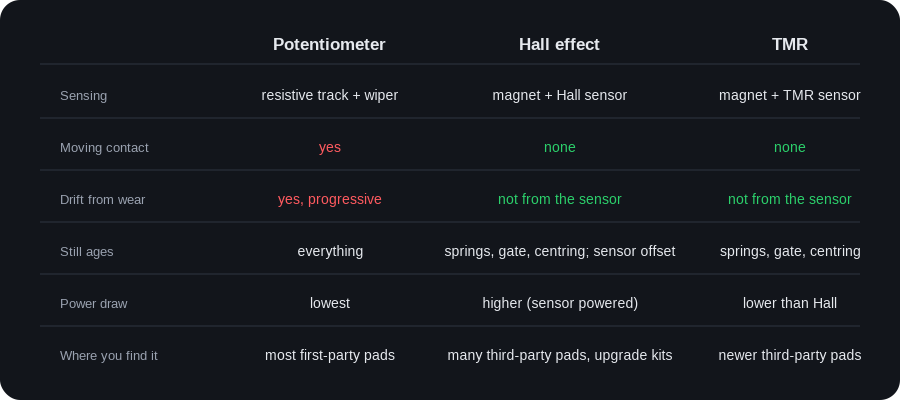
Three stick technologies are on the market, and the names get used loosely. Potentiometer sticks are in nearly every first-party controller shipped in the last decade and in most budget pads; cheap, low-power, well understood, and subject to wear drift. Hall effect sticks use the magnetic sensing described above; they are in many third-party controllers and in replacement stick modules sold for repairing first-party pads, and they remove wear drift at the cost of a slightly higher power draw (the sensor is powered continuously) and a sensitivity to strong external magnets. TMR (tunnelling magnetoresistance) sticks also sense a magnet without contact, with a different sensor type that changes its resistance in a magnetic field; the practical differences claimed by makers are lower power consumption than Hall sensors, which matters for wireless battery life, and finer resolution. For the question this guide is about, drift from wear, hall effect and TMR are the same answer: neither has a contact to wear. Where they differ is at the margins of battery life, noise and cost, and in how new the designs are.
One honest note on “resolution” claims: the browser’s Gamepad API reports stick axes as floating-point values, and the gamepad tester shows them to four decimals, but the resolution you can see there is set by the controller’s firmware and the host’s report format as much as by the sensor. A potentiometer stick on a good controller already reports finer steps than a thumb can produce.
Do they really never drift?
They do not drift from the cause that kills potentiometer sticks, and that is the cause of nearly all of the drift people experience. They can still show drift-like symptoms from everything else in a stick module, which the sensor does not touch. Centring springs and the gimbal wear and weaken, so a stick returns to a slightly different rest position, or returns slowly; the test shows this as an offset that changes between presses rather than a steady value. Gates and bushings wear, which shows as a circularity error, the stick reaching further in some directions than others. Sensor offset can shift a little with temperature and age, which is why hall effect controllers often have a recalibration routine in their software; a stick that reads an offset in one session and not the next is asking for that. Magnetic interference is the hall effect stick’s own failure mode: a strong magnet near the controller (a phone case, a magnetic mount, a speaker) can pull the reading, which goes away when the magnet does. And firmware matters as much as the sensor: a controller that applies a poor deadzone or a coarse filter to a perfect sensor feels no better than a worn potentiometer.
So the honest claim is narrower than the marketing: a hall effect or TMR stick will not develop the slow, permanent, one-direction centre creep that is the signature of a worn potentiometer, and for most owners that is the drift that mattered. It can still wear mechanically, it can still be miscalibrated, and it can still be ruined by a drop. The stick drift guide covers the diagnosis and repair side for any stick type, and its section on hall effect replacement modules is the practical route for an existing controller.
What to look for in a hall effect controller
If you are buying for drift resistance, the sensor is the first item on the list but not the only one.
- Which sticks, exactly. Some controllers advertise hall effect for the sticks only, some for the triggers only (where it also removes wear, on analog triggers), and some for both. Read the specification rather than the headline.
- Calibration and deadzone in software. A companion app or an on-controller routine to recalibrate the centre and set the deadzone per stick is worth more than a sensor it cannot adjust. A deadzone that can go to zero is how you discover how good the sensor is.
- Circularity and gate. A clean round or octagonal gate with consistent reach in every direction; the tester’s circularity test measures it, and a new controller with 5–10 % circularity error is poorly built regardless of its sensor.
- Centring. Press the stick to each edge and release; it should return to the same rest value every time, within the sensor’s noise. The drift test’s resting-drift measurement, repeated after several deflections, shows this.
- Interference handling. Shielding and a sensible sensor placement; a controller whose sticks jump when a phone sits next to it has neither.
- Latency and connection. None of this helps if the controller’s wireless link is slow; the controller latency test compares a wired and wireless run on your own machine.
- Warranty and repairability. A controller with replaceable stick modules outlasts one without, whatever the sensor. Hall effect replacement modules exist for several first-party controllers; fitting one is a soldering job on most pads and a drop-in on a few.
What this page will not do is recommend models. Controllers change yearly and a list would be wrong within months; the properties above are what to check in any review or specification, and the tests below are what to run on the one you buy.
Triggers and buttons: where else contact wear shows
Sticks are not the only analog part of a controller. The triggers on most pads are also potentiometers, a small wiper on a track turned by the trigger’s pivot, and they wear the same way: a trigger that rests above zero, that reaches full pull late, or that jumps partway through the travel has a worn track, which the gamepad tester’s trigger bars show at a glance and which feels like a car that creeps forward in a racing game or a gun that fires on its own. Hall effect triggers exist for the same reason hall effect sticks do and remove that wear; controllers that advertise “hall effect” sometimes mean the triggers only, which is worth checking against the specification. Buttons are a different matter: face and shoulder buttons are digital contacts (membrane domes or micro-switches on most pads) that wear by becoming mushy or double-registering, and no magnetic sensor changes that; the tester’s raw table shows a double registration as a value that flickers on one press.
Calibration and deadzone on a hall effect controller
A magnetic sensor needs a reference: the controller has to know what field strength means “centre” and what means “edge”, and those values can shift a little with temperature, with age, and with how the stick was assembled. That is why nearly every hall effect controller ships with a calibration routine in its software, usually a few seconds of rolling the sticks around their gates and leaving them at rest, and why a small resting offset on a new hall effect controller is a calibration matter rather than a defect. Run the calibration when the stick drift test shows a steady offset that did not use to be there, when the controller has been stored somewhere hot or cold, and after any firmware update. Then set the deadzone from the measurement rather than by feel: the test suggests a deadzone that sits just above the measured resting value, and on a well-calibrated magnetic stick that can be very small, which is where the technology’s precision shows. A deadzone far larger than the measured offset wastes the sensor; one smaller than the offset gives you the drift the sensor was meant to prevent. Potentiometer controllers have the same two controls where their software exposes them, with the difference that on a worn potentiometer the offset keeps growing and the deadzone has to chase it.
Cost, battery and other trade-offs
Hall effect and TMR sticks cost more than potentiometers, and the price shows in the controller or in a replacement module. The Hall sensor draws current continuously, which on a wireless controller is a measurable share of battery life; TMR sensors are marketed partly on drawing less. Magnetic sticks are sensitive to external magnetic fields, so a controller stored on a magnetic phone mount or beside a speaker can read an offset until it is moved, which looks like drift and is not. And a magnetic sensor is only as good as the firmware reading it: filtering that is too coarse adds latency and steps, filtering that is too fine passes sensor noise through as jitter, and the deadzone and response curve settings decide how the stick feels more than the sensor does. The latency test and the gamepad tester’s raw values show the result of those firmware choices on any controller, which is a fairer basis for comparison than the sensor type on the box.
Test any controller
Three measurements separate a good stick from a worn or badly made one, and all three are available in the browser for any controller the system can see. Connect the controller, press a button, and run the drift measurement: leave both sticks untouched and it reads the resting position as a percentage of travel, repeats, and reports the band in which the reading sits and a suggested deadzone. On a healthy stick of any type the resting value is a fraction of a percent; a potentiometer stick in the early stages of wear sits at a few percent and grows; a hall effect stick with a calibration offset sits at a steady small value that the controller’s recalibration removes. Then the gamepad tester’s circularity test: roll each stick firmly around its gate and read the error, which is mechanical and independent of the sensor. Then a return-to-centre check: deflect to each edge, release, and watch whether the raw X/Y return to the same values; a stick whose rest point wanders is a spring or gimbal matter. Record the figures from the PNG report on the day you buy, and run the same three measurements every few months. On a potentiometer controller the resting drift will climb; on a hall effect or TMR controller it should not, and if the circularity or centring changes instead, you have found the part that wears on every controller regardless of what sits under the stick.
FAQ
What is a hall effect controller? A controller whose thumbsticks (and sometimes triggers) sense position with a magnet and a Hall sensor instead of a potentiometer’s wiper and resistive track. With no contact between the moving part and the sensor, there is no track to wear, which removes the usual cause of stick drift.
Do hall effect controllers drift? Not from contact wear, which is why potentiometer sticks drift. They can still show offsets from spring and gimbal wear, calibration shifts with temperature or age, or a magnet held nearby, and their gates wear like any other. The stick drift test shows which kind of offset you have.
Is TMR better than hall effect? For drift, they are equivalent: both sense a magnet without contact. TMR makers claim lower power draw and finer resolution; in a controller the firmware, deadzone handling and build quality decide more than the choice between the two sensors.
Can I put hall effect sticks in my PS5 or Xbox controller? Replacement hall effect stick modules exist for several first-party controllers. Fitting them usually means opening the controller and soldering, which ends the manufacturer’s warranty; some third-party controllers use drop-in modules instead. The stick drift guide covers the repair options.
Why does my new hall effect controller show a small value at rest? Sensor noise and calibration offset: a fraction of a percent is normal and sits inside any deadzone. A steady offset of a few percent is a calibration issue, which the controller’s software can usually reset; one that changes between presses is mechanical centring.
How do I test a controller for drift before buying? Connect it to a PC or phone, press a button, and run the stick drift test with both sticks untouched, then the circularity test in the gamepad tester. Resting drift under 1 %, consistent return to centre and a low circularity error are what a good stick of any type looks like.
Do hall effect triggers matter? On controllers with analog triggers, yes, for the same reason: the trigger potentiometer wears and starts reading pressure that is not there, which shows as a trigger that rests above zero. A hall effect trigger removes that wear; the gamepad tester’s trigger bars show whether yours rests at exactly zero.