Backlight Bleed vs IPS Glow: What's Normal?
Put a black screen on a new IPS monitor in a dark room and you will almost certainly see something in the corners. Whether that something is IPS glow, backlight bleed or clouding decides whether you have a normal panel, a panel worth exchanging or a panel that will look the same however many times you swap it. The backlight bleed test shows the black and dark-gray fields and walks you through the four checks; this guide explains what each result means, how much is normal, and what, if anything, reduces it.
How to tell the difference (the angle test)
Three things show up on a black screen in the dark, and one movement of your head separates them.
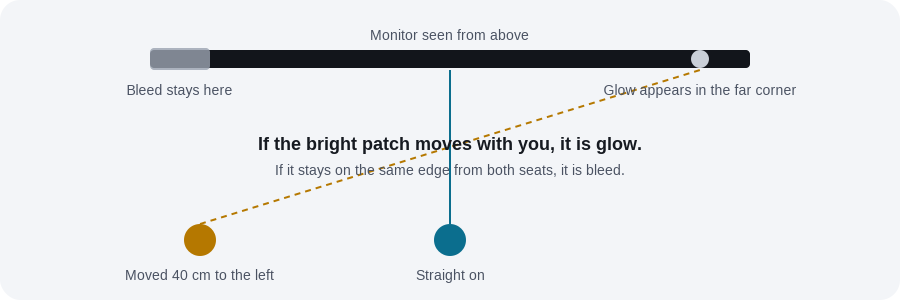
IPS glow is a pale sheen, often silvery, sometimes warm or slightly purple, that sits in the corners of an IPS panel when you look at it from off-axis. It is not light leaking from anywhere: it is the liquid crystal itself scattering light when viewed at an angle, and it is a property of the IPS technology. Move your head 30 or 40 cm to one side and the glow shifts to the far corners and fades from the near ones; sit back further and it shrinks; lean in close and it grows. That movement is the signature.
Backlight bleed is light from the LEDs along the edge of the panel escaping around the liquid-crystal layer instead of passing through it. It appears as brighter patches or streaks hugging the edges and corners, usually the same cool white as the backlight, sometimes in a distinct shape such as a thumb-sized blotch near a corner. It is in the same place from every angle. Move your head and it stays exactly where it was.
Clouding is unevenness in the middle of the screen rather than at the edges: lighter blotches, a mottled or “dirty” look, bands of slightly different brightness. It comes from the diffuser sheet and light guide behind the panel not spreading the backlight evenly, and it also stays put when you move. It is usually more visible on a dark gray field than on black, which is why the test includes 5 % and 10 % gray.
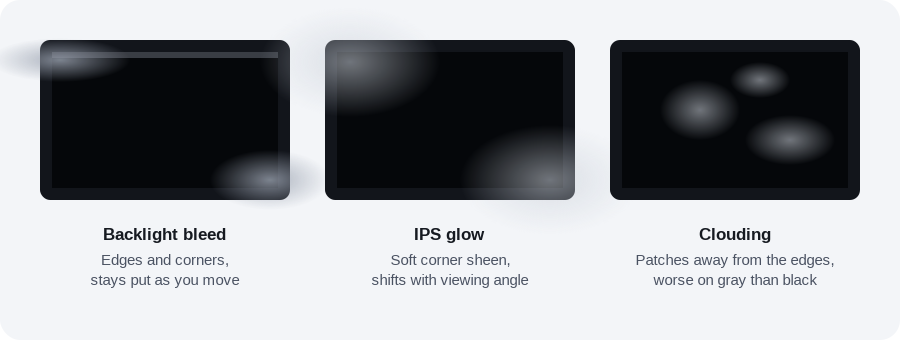
To run the angle test: set the test to black, go full screen, dim the room, wait for the 30-second adaptation countdown, and sit where you normally sit. Note what you see in the corners. Then move your head to one side, then up and down, and watch. Whatever moves is glow. Whatever stays is bleed or clouding, and its position, edges or middle, tells you which.
Clouding
Clouding deserves its own section because it is often mistaken for bleed and treated the same way, and the remedies differ. Bleed is a seal and alignment problem at the panel’s edge; clouding is the backlight’s diffusion being uneven across the whole area. Large screens are more prone to it because the light has further to travel from the edge LEDs, and VA televisions in particular show it as a mottled “dirty screen effect” on panning shots of grass or ice. Mild clouding is normal on big panels and invisible in most content; heavy clouding that shows in dark film scenes or as blotches on a gray desktop background is a defect.
Two cousins of clouding are worth naming because they appear in reviews. Dirty screen effect (DSE) is clouding seen in motion: on a uniform moving background the unevenness shows as smudges that seem to slide across the picture, which is why sports and nature footage reveals it. Vertical banding is clouding arranged in stripes, often following the columns of a direct-lit backlight or the seams of the diffuser; it shows on the 10 % and 25 % gray fields as faint lighter and darker bars. Both belong in the clouding family: they are backlight uniformity problems, not edge leaks, and they are judged by the same rule, visible in normal content or not.
Clouding does not respond to the pressure-relief tricks that occasionally help bleed, because nothing is pressing on anything; it is in how the backlight was assembled. Letting a new panel settle for a few weeks sometimes evens it out slightly as the diffuser sheets relax, and running the brightness lower makes it less visible, but a panel with strong clouding will have strong clouding. If it bothers you in normal viewing, exchange it.
Normal or a reason to return?
Every edge-lit LCD leaks a little light, and every IPS panel glows off-axis, so “none” is not the standard. The standard is what you can see in the content you actually watch, at your normal brightness, from your normal position.
Normal: IPS glow of any visible amount when viewed off-axis; faint brighter corners on a black screen in a dark room that disappear as soon as anything is on screen; slight clouding visible only on a dark gray test field.
Borderline: bleed or clouding you can see in the letterbox bars of a film or in a dark game scene, in a dark room, at your normal brightness. Whether to exchange depends on how much dark content you watch and how much the particular panel bothers you; a replacement unit may be better or worse.
Return it: bleed visible with room lights on; a distinct bright blotch or streak that draws the eye in ordinary dark content; heavy clouding or banding across the middle; any of these combined with a dead pixel or a line, which makes the decision easy.
Before you decide, judge the panel under the conditions you use it in, not under the test’s worst case. The test deliberately uses a dark room, a black field and dark-adapted eyes because that is where the differences are visible; a corner that looks alarming under those conditions may be invisible with a desk lamp on and a web page open. Run the test at the brightness you really use, then open a dark film scene or a dark game and see whether you can still find the problem without looking for it. If you can’t, you have a normal monitor and a very sensitive test. If you can, and it bothers you, exchange it within the return window rather than waiting for a warranty claim later, because retailers accept “visible bleed” as a reason far more readily than manufacturers do.
A replacement is also a gamble. Bleed and clouding vary from unit to unit of the same model, so the second panel may be better, worse or merely different. For heavy bleed the odds favor the exchange; for mild bleed, they don’t, and people who exchange three times in search of a perfect edge-lit LCD usually end up buying an OLED.
Remember that IPS glow is never a reason to return an IPS monitor for another IPS monitor; the replacement will glow too. If glow is what bothers you, the fix is a different panel type: VA has far less glow and deeper blacks but worse off-axis color, and OLED has neither glow nor bleed.
Ways to reduce IPS glow, bleed and clouding
For IPS glow: sit further back and straight on, since glow grows with the viewing angle; lower the brightness, which reduces glow in proportion; raise the room lighting slightly, ideally with a bias light behind the monitor, so your eyes don’t adapt to the dark and the corners don’t stand out. Monitors with a matte anti-glare coating tend to show more glow than glossy ones; a monitor with a wide-angle or “low glow” IPS variant shows less. There is no setting that removes it.
For backlight bleed: relieve pressure on the panel first. Loosen the screws of a VESA mount a quarter turn, make sure the stand clamp isn’t over-tightened, and don’t store or ship the monitor flat under weight. A new monitor often bleeds less after a few weeks as the panel settles in its frame. Lower brightness reduces bleed in proportion, and a bias light behind the monitor hides what is left. The widely repeated advice to massage the bezel or loosen the back panel can shift a panel and reduce a bright corner; it can also crack the panel or leave a permanent pressure mark, and it voids most warranties, so don’t do it to a monitor you can still exchange.
For clouding: lower brightness, a bias light, time, and otherwise a different panel.
In all three cases, the test is the measure of progress. Run it before and after any change at the same brightness in the same dark room, and photograph with the exposure turned down until the picture matches what you see; a camera at automatic exposure makes every panel look terrible and tells you nothing about whether the change helped.
Why IPS panels glow
IPS glow comes from the way an in-plane-switching panel blocks light. In the black state the liquid crystal molecules lie flat in one direction and the front polarizer is crossed with the back one, so light that passes straight through is extinguished. Light that passes through at a steep angle meets the crystal layer along a longer, tilted path and its polarization is no longer rotated by exactly the right amount, so a little of it leaks through the front polarizer. The leak grows with the angle, which is why the corners of a large monitor, which you view at the steepest angle from a central seat, glow first and most, and why the glow moves when you move: you are changing which part of the screen you see steeply.
That geometry explains the practical behavior. A bigger monitor viewed from the same distance has steeper corner angles and more glow. Sitting further back flattens every angle and shrinks the glow. Curved IPS monitors glow less at the edges because the curve points the edges toward you. Panels described as having a wide-angle or “low glow” layer add a compensation film that corrects the off-axis polarization and cut the glow substantially, which is why two IPS monitors of similar specification can differ so much in this one respect. Matte coatings scatter the leaked light and make the glow look broader and paler; glossy ones show it as a smaller, sharper sheen.
Backlight bleed has none of this physics behind it; it is mechanical. The panel is a sandwich of glass, polarizers and films held in a frame, with LEDs along one or more edges shining into a light guide. Where the frame presses unevenly, where the sandwich is not perfectly flat, or where the black masking tape at the edge is short, light from the guide escapes around the liquid-crystal layer instead of through it. Pressure makes it worse, which is why a tight VESA mount or a monitor shipped flat can arrive with corner bleed that a looser mount or a few weeks upright relieves.
IPS glow on laptops, TVs and phones
Laptop IPS panels are viewed from closer and at a more variable angle than a desktop monitor, so their glow is often more obvious: tilt the lid a few degrees and the lower corners light up. Because the screen is small, the corners are not at steep angles from a central position, so the glow is modest when the lid is set straight; most laptop “bleed” reports are glow at an unusual lid angle, and the angle test settles it in seconds. Laptop panels with a 16:10 or 3:2 ratio and higher density show the same behavior.
Televisions with IPS panels are the extreme case. A 55-inch screen viewed from two meters has corner angles steep enough that glow is visible in any dark scene, and IPS televisions are chosen for their wide viewing angles for the whole sofa rather than for dark-room contrast; a VA television has far less glow and deeper blacks but washes out for the person at the end of the sofa. Local dimming on a television hides both glow and bleed by turning the backlight down behind dark areas, which is why a well-dimmed IPS television can look better in a dark scene than a cheap VA one.
Phones and tablets with IPS LCD screens show glow when held at an angle and bleed, when present, as a bright edge along the side where the LEDs sit, often near a button or the camera cutout where the frame is tightest. OLED phones show neither, and a bright patch on an OLED phone in a dark room is a different fault, usually pressure or burn-in, which the screen burn-in test covers.
Buying to avoid bleed and glow
If dark-room content matters to you, the order of preference is clear: OLED has neither glow nor bleed; VA has little glow and modest bleed with good contrast; IPS has glow by nature and bleed by luck. Within IPS, look for reviews that photograph the black screen in a dark room at a stated brightness, mention a low-glow or wide-angle film, and show a uniformity measurement rather than a single adjective. Smaller screens and flat screens are less prone to both problems than large and curved ones, and a monitor that will sit on a desk arm should be mounted with the screws snug rather than tight.
Whatever you buy, test it in the first week with the backlight bleed test at your real brightness in a dark room, decide using the content you watch rather than the black field, and exchange within the retailer’s window if it fails that test. The retailer’s return window is the only point at which bleed is handled without argument; manufacturers’ warranties cover defects, and uniformity that meets their internal specification is not one.
FAQ
Is IPS glow a defect? No. It is a property of IPS panels and every IPS monitor has some; it changes with viewing angle, distance and brightness. Manufacturers do not accept it as a warranty fault, and a replacement IPS monitor will glow too.
Is backlight bleed a defect? Mild corner bleed on a black screen in a dark room is within normal range for an edge-lit LCD. Bleed that is visible in ordinary dark content, or with room lights on, is beyond normal and a reasonable reason to exchange within the retailer’s return period.
Can IPS glow be fixed? Reduced, not removed: sit further back and straight on, lower the brightness, add a bias light behind the monitor so your eyes are less dark-adapted. A different panel type is the only full fix.
Does backlight bleed get worse over time? Usually not; most bleed is present from the start and some eases as the panel settles in its frame. Bleed that appears or grows later points to pressure, such as an over-tightened mount, or to the frame warping with heat.
How do I photograph bleed for a return? Dark room, test on black at your normal brightness, camera from your seating position, exposure lowered until the photo matches what you see. Include the test’s nine-zone grid and a short video while moving sideways, which shows whether the light moves (glow) or stays (bleed).
Does lowering brightness fix bleed? It reduces it in proportion, because less light is reaching the leak, and for most people a brightness around 120 cd/m² for a dark room makes mild bleed disappear in practice. It is the first thing to try on a monitor past its return window and often the only thing needed.