Dead Pixel Policy by Brand: Samsung, Dell, LG, ASUS & More
A dead pixel policy is the number of defective pixels a manufacturer will tolerate before it agrees that a screen is faulty. Every monitor brand has one, few customers read it before buying, and the differences are large: one brand replaces a panel for a single bright pixel, another expects you to live with five. This guide collects the policies we could verify on the brands’ own support pages, with the numbers, the conditions and a link to each source, and explains how to count your pixels so a claim is not rejected on a technicality. Before you read the table, run the dead pixel test: it cycles black, white, red, green and blue, lets you mark each dot and downloads a report with the coordinates, which is exactly what the policies below ask you to document.
How pixel policies count defects
Policies do not count “dead pixels” in the everyday sense. They count sub-pixels, the red, green and blue elements that make up each pixel, and they sort them into classes. A bright sub-pixel (also called hot or stuck-on) is one that is lit on a black field; a dark sub-pixel (dead, stuck-off) is one that stays black on a white or coloured field. A whole pixel that is permanently white counts as three bright sub-pixels on most policies; a whole black pixel as three dark ones. Bright defects are treated far more strictly than dark ones, because a white dot on a dark film scene is visible from across a room while a black dot on a white page is not, and that asymmetry runs through every policy in the table. Some policies add a third class, adjacent or clustered defects, two faults within a few millimetres of each other, and allow only one such pair or none.
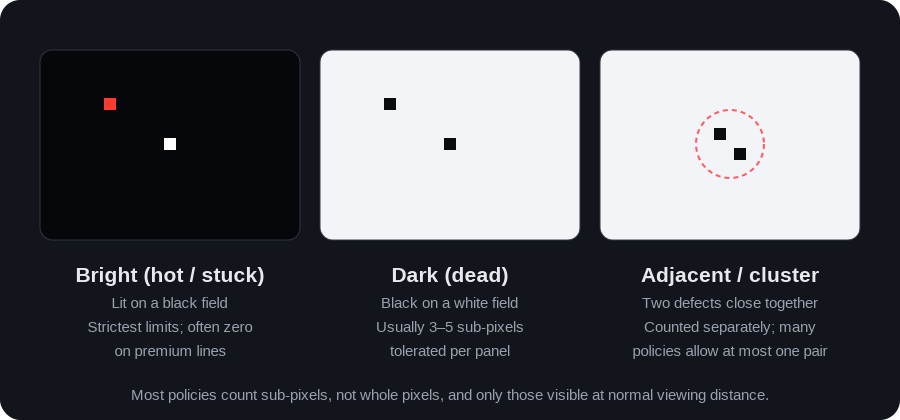
Several policies still cite ISO 13406-2, an older standard that defined pixel-fault classes for flat panels; its Class II, the one almost all consumer panels were specified to, allowed a small number of bright, dark and sub-pixel defects per million pixels. The standard was withdrawn and replaced by ISO 9241-307, but the “Class II” idea survives in the policies as an acceptance level of three to five defective dots on an otherwise ordinary panel. Policies also commonly exclude anything you cannot see at normal viewing distance, anything smaller than a stated fraction of a sub-pixel, and foreign material trapped in the panel (which is a different defect, usually covered as ordinary workmanship).
The last thing to know before the table: the policy applies to the manufacturer’s warranty, not to the retailer’s return window. In the first days after purchase, the shop you bought from usually takes a return for any defect you find unacceptable, and consumer law in many countries backs that. The pixel policy matters when the return window has closed and you are dealing with the brand under warranty.
Dead pixel policy by brand (official pages, checked 20 October 2026)
Every row below was read on the brand’s own page on the date given, and the link goes to that page. Policies differ by region and by product line, and they change; treat the table as a map of where to look and what to expect, and read the page for your model and country before you claim. Brands whose official policy page we could not open at the time of writing are listed afterwards rather than in the table, so that nothing here is quoted second-hand.
| Brand | What the policy says | Zero-bright-dot cover | Source |
|---|---|---|---|
| Dell | Defines a bright pixel as all three sub-pixels permanently on and a dark pixel as all three off; “only stuck pixels and subpixels visible at normal viewing distance count toward warranty evaluation.” Monitors with Premium Panel Exchange are replaced for a single bright pixel/sub-pixel and allow up to 5 dark sub-pixels (up to 12 on the 55-inch and 39-inch Alienware models listed). Other Dell displays have model-dependent allowances listed on the same page. | Yes, on Premium Panel Exchange models: Alienware, UltraSharp (U and UP), Dell Pro P, S series from 2020, G series and C/P conferencing monitors. | Dell Display Pixel Guidelines (page updated 12 Oct 2026) |
| ASUS | Bright dot: “a white or sub-pixel always on under a black pattern”; dark dot: “a black or sub-pixel that is always off under any pattern.” Standard panels conform to ISO 13406-2 with an acceptance level of three to five defective dots. For monitors bought before February 2022, the Zero Bright Dot warranty gave ProArt panels 0 bright / ≤ 5 dark dots for 36 months and other series ≤ 3 bright / ≤ 5 dark. For monitors bought after February 2022, the Perfect Pixel warranty covers any bright or dark dot (0 / 0) for 36 months on the listed models. | Yes (Zero Bright Dot, and Perfect Pixel from Feb 2022), model list on the page; OLED models excluded from some rows. | ASUS LCD Monitor Pixel Policy (Australia) |
| BenQ | Three defect kinds: bright/hot (white, always on), dead (black, always off) and stuck (red, green or blue, always on or off). Australia FAQ table: below Full HD, 3 bright / 3 dark / 5 total sub-pixels accepted; Full HD, QHD and 4K panels, 2 bright / 5 dark / 5 total. The European policy document instead requires at least 5 defective sub-pixels across the screen, or a single defective sub-pixel in the central ninth of the screen, before repair. | On “models applicable to ZBD guarantees” (listed per model, not in the policy text): one bright pixel is enough for exchange. | BenQ dead pixel policy FAQ (Australia) · BenQ LCD Monitor Dead Pixel Policy (EU PDF) |
| Samsung | Policies are published per region. Singapore: monitors carry a Zero Bright-Dot Warranty for 7 days from retail purchase, bright dots being “pixels that are always lit or on,” with a one-to-one exchange. Thailand (FHD/QHD/UHD monitors): exchange from 1 bright dot, from 4 dark green dots, from 6 dark red or blue dots, from 1 adjacent pair, with a minimum spacing of 20 mm between counted dots. We found no single English-language global page with numbers. | Yes in Singapore, for 7 days only; elsewhere check your regional page. | Samsung Singapore warranty · Samsung Thailand monitor screen warranty guidelines |
| LG | LG’s support pages define dark-dot and bright-dot defects and state that “there can be inactive pixels of about 1 PPM (1 per million)” which “does not affect the performance or reliability” of the product, and that “different dead pixel policies apply to different models.” No numeric table is published; LG asks you to contact the customer centre or a service centre for inspection. | Not stated on the pages we read. | LG product help: dots on the screen · LG USA: laptop dots on the screen |
| Apple | Apple describes pixel anomalies as sub-pixels that remain off (dark) or on (bright) because a transistor “may not work perfectly,” says a low number of such transistors is possible on an LCD, and publishes no numeric threshold. If you think your display has more than an acceptable number, Apple asks you to bring it to an Apple Store or authorised provider for evaluation, noting “there may be a charge for the evaluation.” | No. | Apple: About LCD display pixel anomalies |
Brands not in the table. Acer publishes a per-resolution table on its warranty pages (bright and dark sub-pixel limits by panel resolution, with stricter limits for its professional BM series) and a separate Zero Bright Dot article for selected models, but the pages did not load for us on the day of checking, so we have not reproduced the numbers; start at Acer’s dead pixel policy page for your region. Gigabyte’s monitor warranty page was not accessible to us either. MSI, Philips, AOC, ViewSonic and others publish policies on their own support sites or in the warranty leaflet in the box; the pattern is the same (bright counted strictly, dark tolerated, a zero-bright-dot promise on some gaming and professional lines), and the numbers are only worth quoting from the page for your model and country.
Zero bright dot: what it does and does not promise
A zero-bright-dot (ZBD) guarantee says that a single bright sub-pixel, white or coloured on a black field, is enough for a replacement during the stated period. It is the policy worth looking for when you buy, because bright defects are the ones you will actually see in use. Read the conditions, though: it may run for a shorter time than the main warranty (seven days in Samsung Singapore’s case, the full warranty on Dell’s Premium Panel Exchange models, 36 months on ASUS’s Perfect Pixel models); it typically still tolerates a few dark sub-pixels; it applies to listed models rather than a whole brand; it often excludes partially lit sub-pixels and anything not visible at normal distance; and on OLED monitors some brands exclude it or treat the panel under separate terms. ASUS’s post-2022 Perfect Pixel warranty is unusual in covering dark dots as well; most ZBD promises do not.
A policy without ZBD is not a bad policy if the numbers are low and the brand honours them, but it does mean that a single bright pixel in month three is, by the manufacturer’s definition, not a defect. Your remedy for that pixel is the retailer, in the return window, which is the point of the next section.
Return window vs warranty: who decides, and when
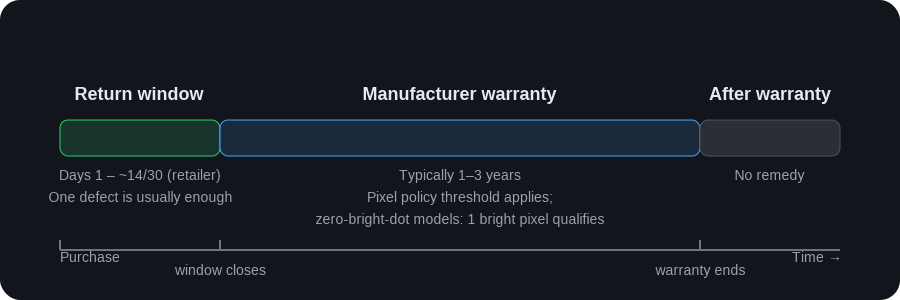
Three periods, three sets of rules. In the return window, usually 14 to 30 days from a retailer and sometimes longer, you can return or exchange a screen that does not satisfy you, and a dead or bright pixel is a reason most retailers accept without reference to the manufacturer’s count. Distance-selling rules in the UK and EU give an unconditional 14-day right of withdrawal on online purchases, and many shops extend it. This is the one period in which you hold all the cards, so test on day one. Under manufacturer warranty, the pixel policy is the contract: a claim succeeds if your count exceeds the published threshold or the model has ZBD cover, and otherwise it does not, however annoying the pixel. Statutory rights for goods that are not of satisfactory quality can still apply in some countries, but you will be arguing that a single pixel breaches them against a published standard that says it does not, which is slow. After warranty, there is no remedy except repair at your cost, which for a panel is close to the price of a monitor.
Keep the receipt, the order confirmation and the serial number together with the test report, because the warranty clock starts at the retail purchase date and a claim without proof of that date is judged from the manufacturing date instead, which can be months earlier.
The same timeline applies to pixels that appear later. A stuck pixel that turns up in month eight on a model with ZBD is a claim; the same pixel on a model with a five-dot tolerance is not, unless it brings the total over the line. Retailers’ extended warranties sometimes have their own pixel terms; read them before paying.
How to count and document your pixels for a claim
Claims are refused for three avoidable reasons: the count is below the threshold, the defects cannot be reproduced when the technician looks, or the panel shows user damage. Here is how to avoid all three.
- Test on every colour. Run the five-colour test in full screen, at your normal brightness, in a dim room, after the screen has been on for twenty minutes. Walk the screen in rows on black (bright defects), then on white (dark defects), then on red, green and blue (single stuck sub-pixels that white and black hide). The white screen and black screen pages are the same fields without the marking mode if you want a quick look.
- Classify. For each dot, note whether it is lit on black (bright) or dark on white (dark), what colour it is, and whether it is a full pixel or a sub-pixel; the test’s marking mode records the colour each dot was seen on. If two dots are close together, measure the distance; some policies treat anything within a stated distance as adjacent.
- Rule out dust. Wipe with a dry microfibre cloth and look at the edge of the dot; dust is soft-edged, off the pixel grid and casts a shadow under angled light. The guide to fixing dead and stuck pixels has the full comparison.
- Download the report. The test’s PNG or PDF report carries the date, your resolution, the device pixel ratio and each marked dot’s coordinates. Keep it with your receipt.
- Photograph. A photo of the full screen with the test pattern showing, and a close-up of each dot, taken on the day you first saw them; stuck pixels can fade and reappear, and a dot that is not there on the service bench is not a defect on that day.
- Do not press on the panel. The pressure method for stuck pixels can leave marks that a technician will classify as user damage, which ends the claim. Try the software fixer if you like; it leaves no trace.
- Quote the policy. When you contact support, say which page you read, which model class your monitor falls in, and how your count compares. Claims that arrive with the brand’s own numbers and a clear report are quicker.
OLED, laptops, phones and TVs
The table is about monitors because that is where published numbers exist. OLED monitors and TVs are often excluded from zero-bright-dot promises or covered under separate terms, and their characteristic faults are different: a dark OLED pixel is a dead emitter, a bright one is a driver fault, and image retention is handled by a separate policy, discussed in our OLED burn-in guide. Laptops mostly follow the panel maker’s policy as adopted by the laptop brand; Apple’s page covers Macs and iPads as well as displays, LG’s laptop page is quoted above, and the big Windows laptop brands publish pixel policies in their support knowledge bases, usually with the same three-to-five-dot language. Phones rarely publish a number at all; a dead pixel on a new phone is a return, and later it is a service evaluation. TVs are handled under each brand’s TV warranty rather than the monitor policy; Samsung’s regional pages, for example, treat any bright pixel on a TV as out of specification while tolerating a single dark one, but you need the page for your country.
Buying with pixel policies in mind
If pixels bother you, and they bother some people far more than others, the policy is part of the product. Prefer a model with a zero-bright-dot promise that runs for the whole warranty, from a retailer with a generous return window; the combination means that a bright pixel on day 200 is still someone else’s problem. Check the policy page before you buy rather than after, because the model lists change and the premium lines are where the strongest promises are. And whatever you buy, test it on the day it arrives, mark what you find, and keep the report; a pixel found inside the return window costs you a trip to the post office, and the same pixel found a month later may cost you nothing at all, or the monitor, depending on which row of the table your screen is in.
FAQ
How many dead pixels are acceptable? It depends on the brand and the class of defect. Under most policies, two to five dark sub-pixels are tolerated on a consumer panel, bright sub-pixels are tolerated less or not at all, and premium lines with a zero-bright-dot promise replace the panel for a single bright one. The table above gives the numbers we verified, with links.
Is one dead pixel covered under warranty? Usually not under the manufacturer’s policy, unless it is a bright pixel on a zero-bright-dot model. In the retailer’s return window a single pixel is normally a valid reason to return. Test early.
What is the Samsung dead pixel policy? It is published per region. Singapore gives a seven-day zero-bright-dot exchange; Thailand’s monitor guideline replaces from one bright dot, four dark green dots or six dark red or blue dots on FHD, QHD and UHD monitors. Check the Samsung support site for your country, as we found no global English page with numbers.
What is Dell’s dead pixel policy? Dell’s Display Pixel Guidelines page defines bright and dark pixels and lists allowances by product line. Premium Panel Exchange models, which include Alienware, UltraSharp, Dell Pro P, newer S series, G series and conferencing monitors, are replaced for one bright pixel and allow up to five dark sub-pixels.
Does LG have a dead pixel policy? LG’s support pages describe dark and bright dot defects, mention inactive pixels at about one per million, and say that policies differ by model, without publishing a table. For LG, the practical route is a service-centre inspection, or the retailer’s return window if you are still in it.
What does ISO 13406-2 Class II mean? The middle class of a withdrawn standard for flat-panel pixel faults, which allowed a small number of bright, dark and sub-pixel defects per million pixels. Several brands still describe their standard panels as conforming to it, which in practice means three to five defects before a panel is considered faulty.
Can a retailer refuse a return for a dead pixel? Within a statutory distance-selling period, no reason is needed to return an online purchase in the UK and EU. Outside that, a shop can point to the manufacturer’s policy and say the screen meets specification. This is why testing within the first days matters more than any policy.